AWS Architecture Diagram from Terraform or CloudFormation (draw.io / Mermaid)AWS 構成図の自動生成: Terraform / CloudFormation から draw.io・Mermaid の構成図を作成
AWS Infra Diagram is a skill for Claude Code and Codex that reads Terraform, CloudFormation or CDK output, or a description, and draws an AWS architecture diagram in draw.io or Mermaid, with a document separating facts from guesses. Free for PMDesk users, no extra charge.Terraform・CloudFormation・CDK の出力、または文章の説明から、AWS 構成図を draw.io か Mermaid で自動生成するスキルです(Claude Code / Codex 対応)。図に加えて、コードに書かれた事実と推測を分けた説明書も作ります。PMDesk ユーザーは追加料金なしで使えます。
Free — no extra charge. Install it from the PMDesk app.無料(追加料金なし)。PMDesk アプリからインストールできます。
See it in action実際の出力例
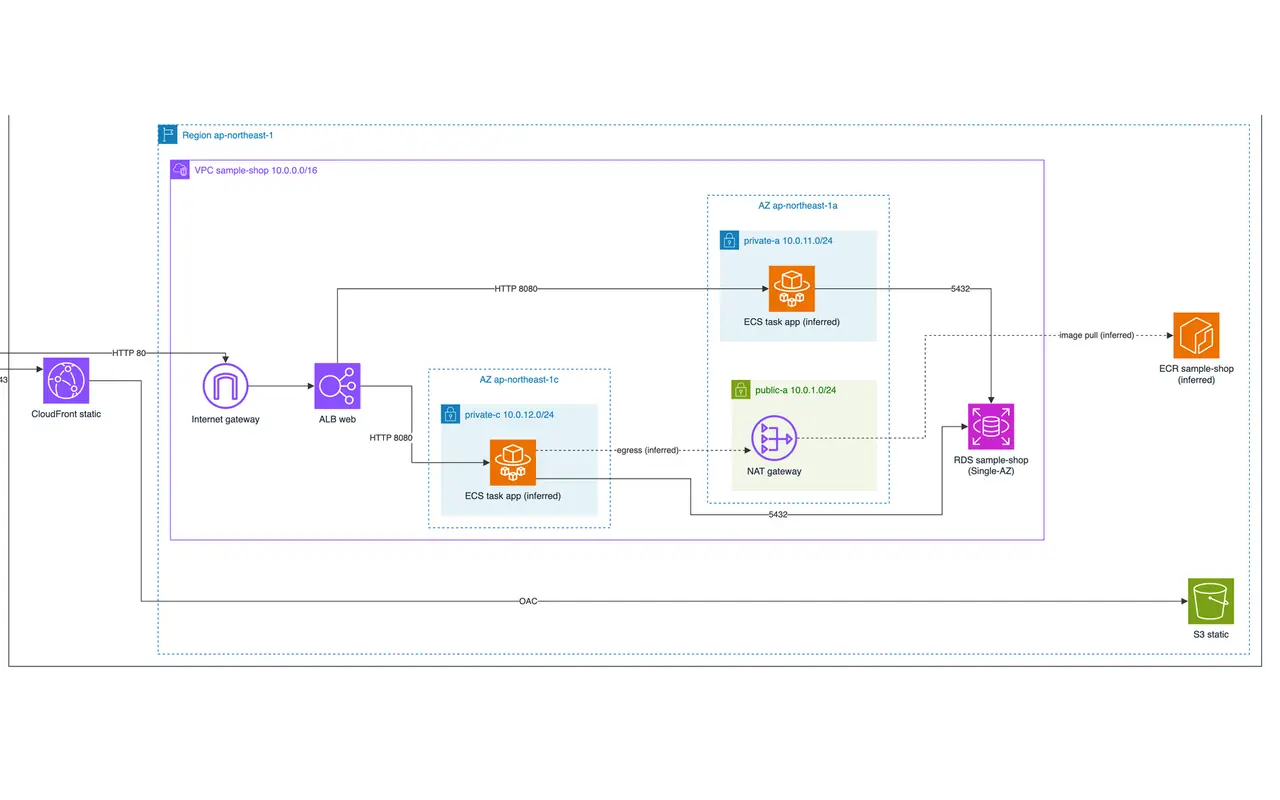
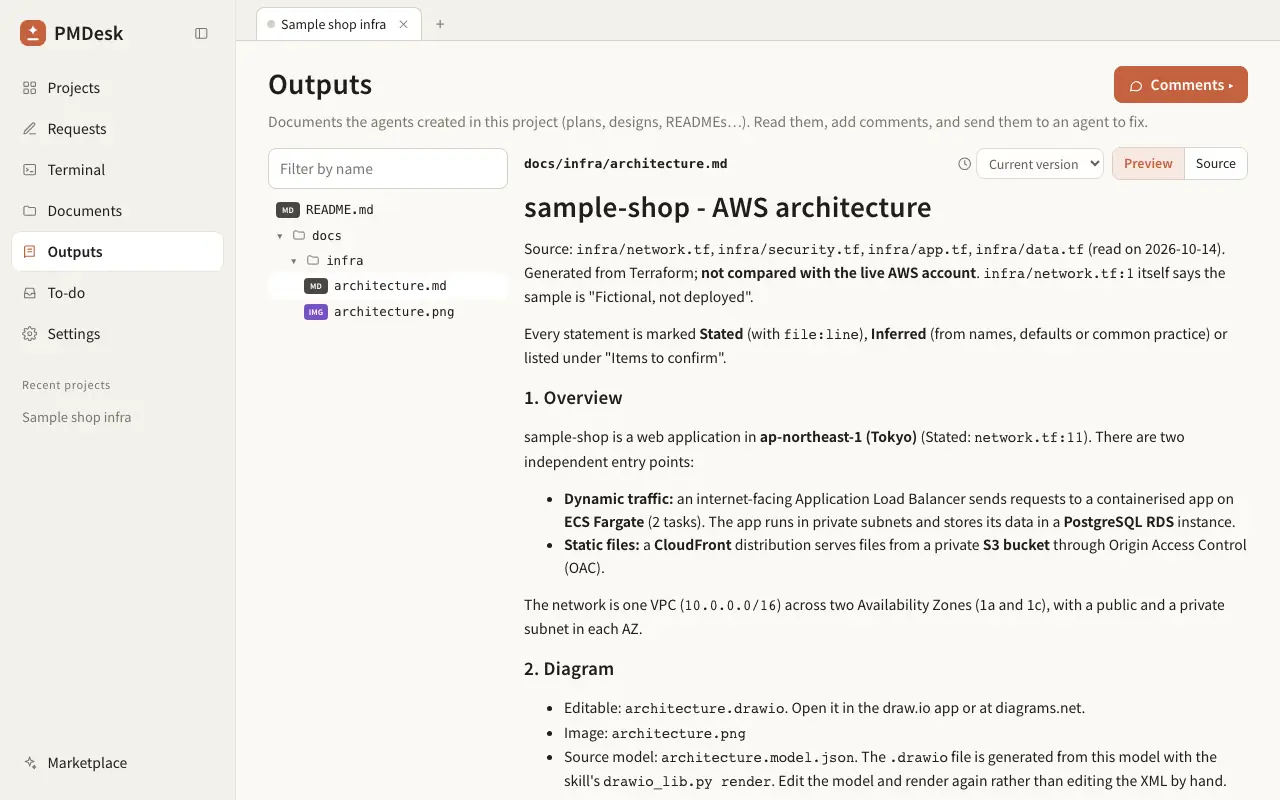
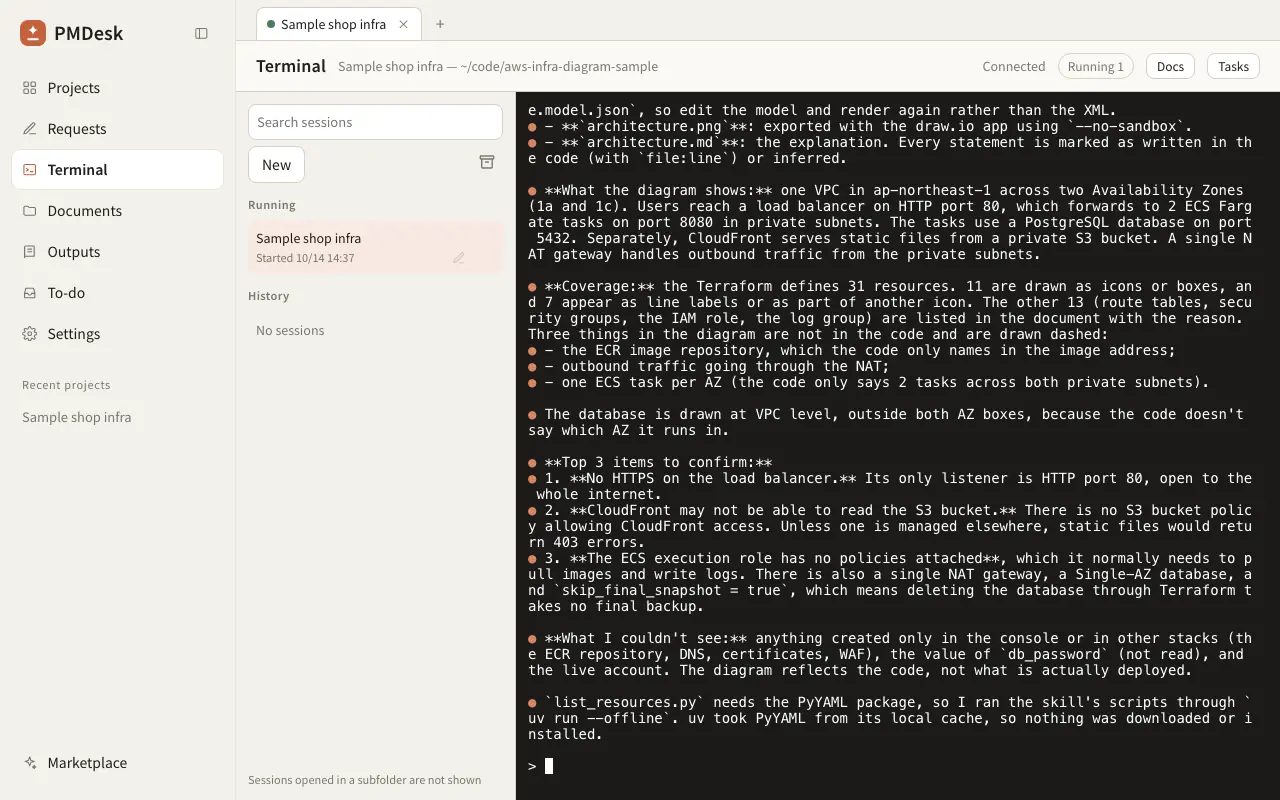
Who it's forこんな方に
What it doesできること
AWS Infra Diagram turns infrastructure code into a diagram you can hand to a client, and writes down what the diagram is based on.
What you get:
- An AWS architecture diagram as draw.io (official AWS icons, grouped by Cloud, Region, VPC, Availability Zone and subnet) or as Mermaid (shows directly in Markdown, easy to review in a pull request).
- An explanation document: how a request flows, network boundaries, what is reachable from the internet, where data is stored, risks worth confirming, and a list of questions for the system owner.
- Every statement is marked as stated (with file and line in your code), inferred (from names or common practice) or unknown. Dashed arrows in the diagram are inferred connections.
Works from Terraform (.tf), CloudFormation or SAM templates (YAML with !Ref / !GetAtt / !Sub, or JSON), CDK output (cdk.out templates), or a plain description if there is no code.
It reads local files only. It never calls AWS, never needs credentials, never runs terraform apply or cdk deploy, and does not change your code. Terraform is read without a full HCL parser, so variables, count and modules are not evaluated; the skill tells you which parts could not be drawn.
In our test sample (a Terraform web stack with a load balancer, containers and a database), all three runs passed the diagram check and our content check, including subnets in the right availability zones. A single run without the skill produced overlapping boxes and placed the subnets outside their availability zones and VPC.
Using Azure or need a database diagram? See the Azure Infra Diagram skill and the ER Diagram skill.
AWS Infra Diagram は、インフラのコードからお客様にそのまま渡せる AWS 構成図を作り、その図が何を根拠にしているかも文章で残すスキルです。
できること:
- AWS 構成図を draw.io(公式 AWS アイコン、AWS Cloud / リージョン / VPC / アベイラビリティゾーン / サブネットの入れ子)または Mermaid(Markdown にそのまま表示、プルリクエストでレビューしやすい)で出力します。
- 説明書を作ります: リクエストの流れ、ネットワーク境界、インターネットから到達できる箇所、データの保存場所、確認したほうがよいリスク、システム担当者への確認事項。
- すべての記述を「記載あり(コードのファイルと行を併記)」「推測(名前や一般的な構成から)」「不明」に分けて明記します。図の破線の矢印は推測した接続です。
入力は Terraform(.tf)、CloudFormation / SAM テンプレート(!Ref / !GetAtt / !Sub を含む YAML または JSON)、CDK の出力(cdk.out のテンプレート)、コードがない場合は文章での説明です。ネットワーク構成図、システム構成図、設計書用の図の作成に使えます。
読むのはローカルのファイルだけです。AWS には接続せず、認証情報も不要で、terraform apply や cdk deploy は実行せず、コードも変更しません。Terraform は完全な HCL パーサーではなく解析するため、変数・count・モジュールは展開されません。描けなかった部分はその旨を報告します。
検証用のサンプル(ロードバランサー・コンテナ・データベースを持つ Terraform の Web 構成)では、スキルありの 3 回とも図の検査と内容チェックに合格し、サブネットも正しいアベイラビリティゾーンに入っていました。スキルなしの 1 回では、図形が重なり、サブネットがアベイラビリティゾーンと VPC の外に置かれていました。
Azure 構成図は Azure Infra Diagram スキル、データベースの ER 図は ER Diagram スキルをご利用ください。
How to use使い方
- Open the PMDesk app, go to Marketplace, open this skill and press Install.PMDesk アプリで「マーケットプレイス」を開き、このスキルを開いて「インストール」を押す
- Choose this project or this Mac.「このプロジェクト」か「このMac」を選ぶ
- Ask Claude Code or Codex to use the skill, then review the result in PMDesk.Claude Code または Codex にこのスキルを使うよう頼み、結果を PMDesk で確認する
Requirements必要なもの
- PMDesk (license or trial)PMDesk(ライセンスまたはトライアル)
- Claude Code or CodexClaude Code または Codex
- uv
Scripts in this skill含まれるスクリプト
scripts/drawio_lib.pyscripts/hcl_scan.pyscripts/list_resources.py
The agent runs these only when it uses the skill, and asks for your permission first.エージェントはこのスキルを使うときにだけ実行し、実行前に許可を求めます。
FAQ
Do I need an AWS account or AWS credentials?
No. The skill only reads local files (Terraform, CloudFormation or CDK output) and never calls AWS. That also means the diagram shows what the code says, not what is actually deployed in the account.
Does it work with Terraform modules and variables?
Partly. Resources defined directly in your .tf files are listed with their references. Variables, locals, count and for_each are not evaluated, and module contents are not expanded, so a module shows up as one box. Pass the module folders as well if they are local, or the skill lists those parts under "Items to confirm".
Should I choose draw.io or Mermaid?
Use draw.io when a client expects an official-looking AWS diagram with icons or someone will edit the layout by hand. Use Mermaid when you want the diagram to show directly in Markdown and in pull requests. The skill asks you and defaults to Mermaid. It can create both.
How accurate is the diagram?
Connections come from references in your code, so they are as accurate as the code. It cannot see console-only resources, other stacks or remote state, and a reference is not proof of network traffic. The explanation document marks every statement as stated, inferred or unknown, and draws inferred connections with dashed arrows, so a reviewer knows what to verify.
Does it work with Codex as well as Claude Code?
Yes. It is a standard skill (SKILL.md plus a Python script run with uv), so any agent that can follow a skill and run a command can use it. In PMDesk you install it once and use it from either agent.
Does it change my infrastructure or send my code anywhere?
No. It does not run terraform apply, cdk deploy or any AWS command, and it does not edit your code. It writes only the diagram and the document. Your agent, as usual, sends the file contents it reads to its own model provider.
AWS アカウントや認証情報は必要ですか?
不要です。このスキルは Terraform・CloudFormation・CDK の出力などローカルのファイルだけを読み、AWS には接続しません。そのため、図はコードに書かれている内容を表すもので、実際にアカウントにデプロイされている状態とは限りません。
Terraform のモジュールや変数には対応していますか?
一部対応です。.tf に直接書かれたリソースと参照関係は一覧にします。変数・locals・count・for_each は評価せず、モジュールの中身も展開しないため、モジュールは 1 つの箱になります。ローカルのモジュールのフォルダも一緒に渡すか、描けなかった部分は説明書の「確認事項」に載せます。
draw.io と Mermaid のどちらを選べばよいですか?
お客様に AWS アイコン付きの構成図を渡したい、または後から手で配置を直したいときは draw.io です。Markdown やプルリクエストでそのまま表示したいときは Mermaid です。スキルが確認し、指定がなければ Mermaid で作ります。両方作ることもできます。
構成図の精度はどのくらいですか?
接続はコード内の参照から作るため、コードと同じ精度です。コンソールだけで作ったリソース、別スタック、リモートステートは見えず、参照があっても通信できる証拠にはなりません。説明書では全記述を「記載あり / 推測 / 不明」に分け、推測の接続は図で破線にするので、レビューする人が確認すべき点が分かります。
Claude Code だけでなく Codex でも使えますか?
使えます。標準的なスキル(SKILL.md と uv で実行する Python スクリプト)なので、スキルに従ってコマンドを実行できるエージェントなら使えます。PMDesk で一度インストールすれば、どちらのエージェントからでも使えます。
インフラを変更したり、コードを外部に送ったりしませんか?
しません。terraform apply、cdk deploy、AWS のコマンドは実行せず、コードも編集しません。作成するのは図と説明書だけです。なお、エージェントが読んだファイルの内容は、通常どおりそのエージェントのモデル提供元に送られます。