E2E Test: write and run Playwright tests from requirements with Claude CodeE2Eテスト自動化:要件からPlaywrightテストを作成
E2E Test turns your requirements into a reviewed test plan, writes Playwright end-to-end tests for your web app, runs them and reports pass/fail in Markdown. For project leads, FDE teams and solo developers; works with Claude Code and Codex. Free for PMDesk users.E2Eテスト(End-to-Endテスト)を自動化するスキルです。要件やリクエストからテスト仕様書を作り、確認を受けてからPlaywrightのテストコードを書き、実行して合否レポートをMarkdownで出力します。PMDesk ユーザーは追加料金なしで使え、Claude Code と Codex に対応。プロジェクトリード、受託開発、個人開発者向けです。
Free — no extra charge. Install it from the PMDesk app.無料(追加料金なし)。PMDesk アプリからインストールできます。
See it in action実際の出力例
Who it's forこんな方に
- Project leadsプロジェクトリード
- FDE / contract developmentFDE・受託開発
- PMs and reviewersPM・レビュアー
- Solo developers個人開発者
What it doesできること
E2E Test helps you check the main flows of a web app in a real browser before you release, without writing the tests by hand. The agent reads your requirements, proposes a test plan, waits for your approval, then writes and runs the tests.
What you get
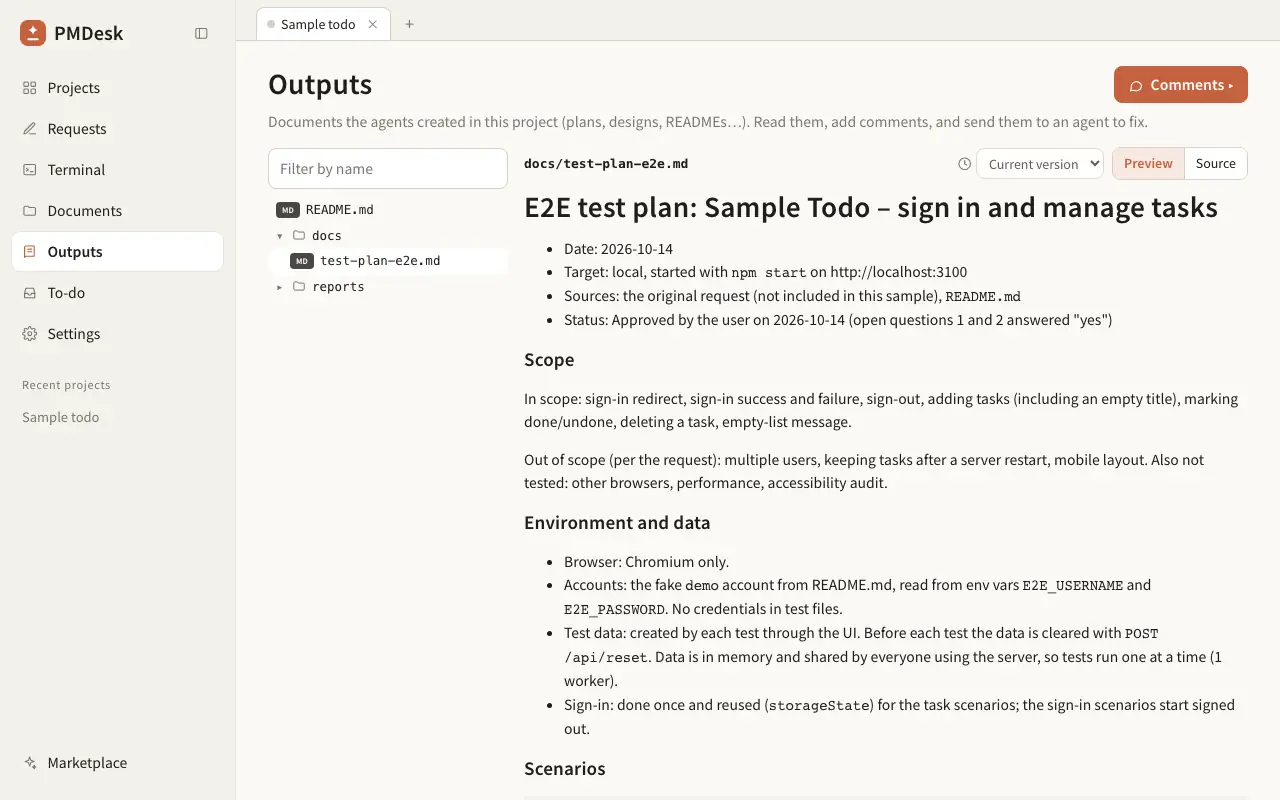
- A test plan (
docs/test-plan-e2e.md) with scenarios, preconditions, test data and expected results. A person who does not read code can review it. - Playwright tests that follow the approved plan, using role and label locators and web-first assertions, with no fixed waits and one sign-in shared by all tests.
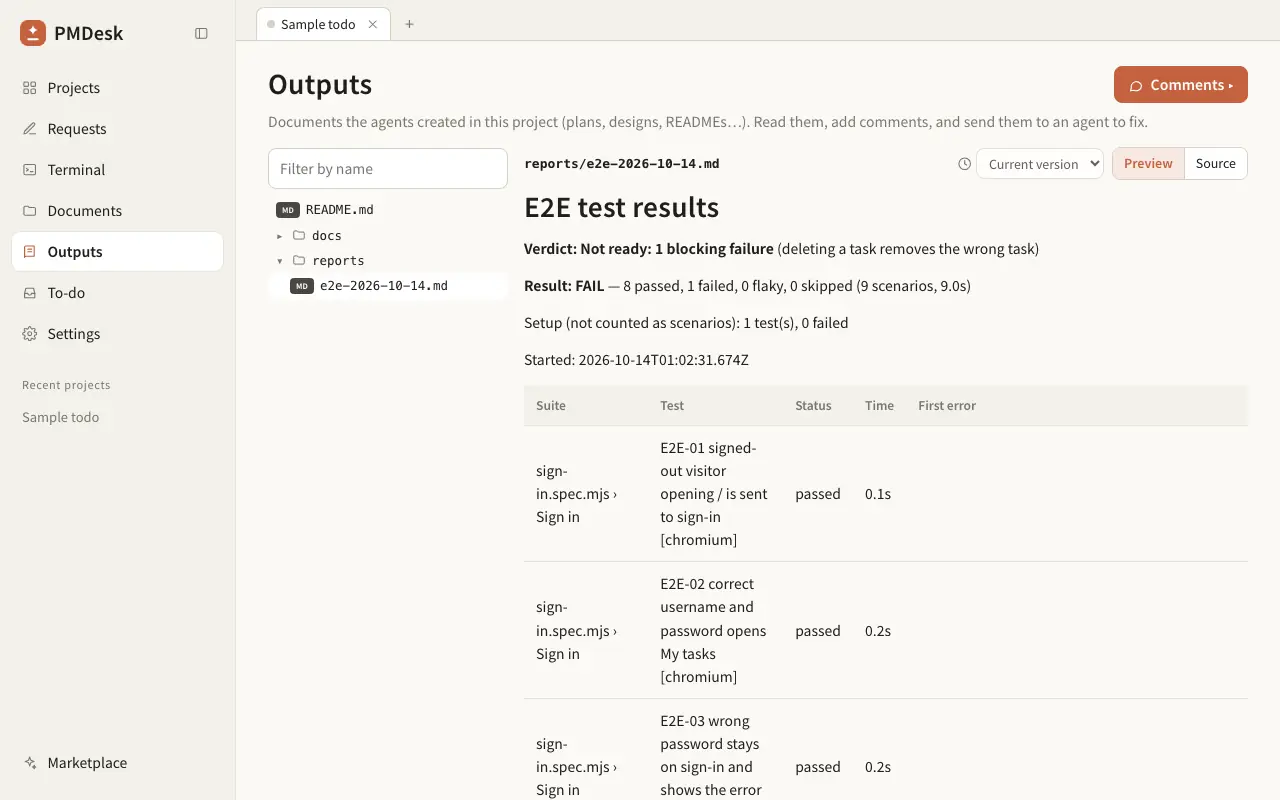
- A pass/fail report (
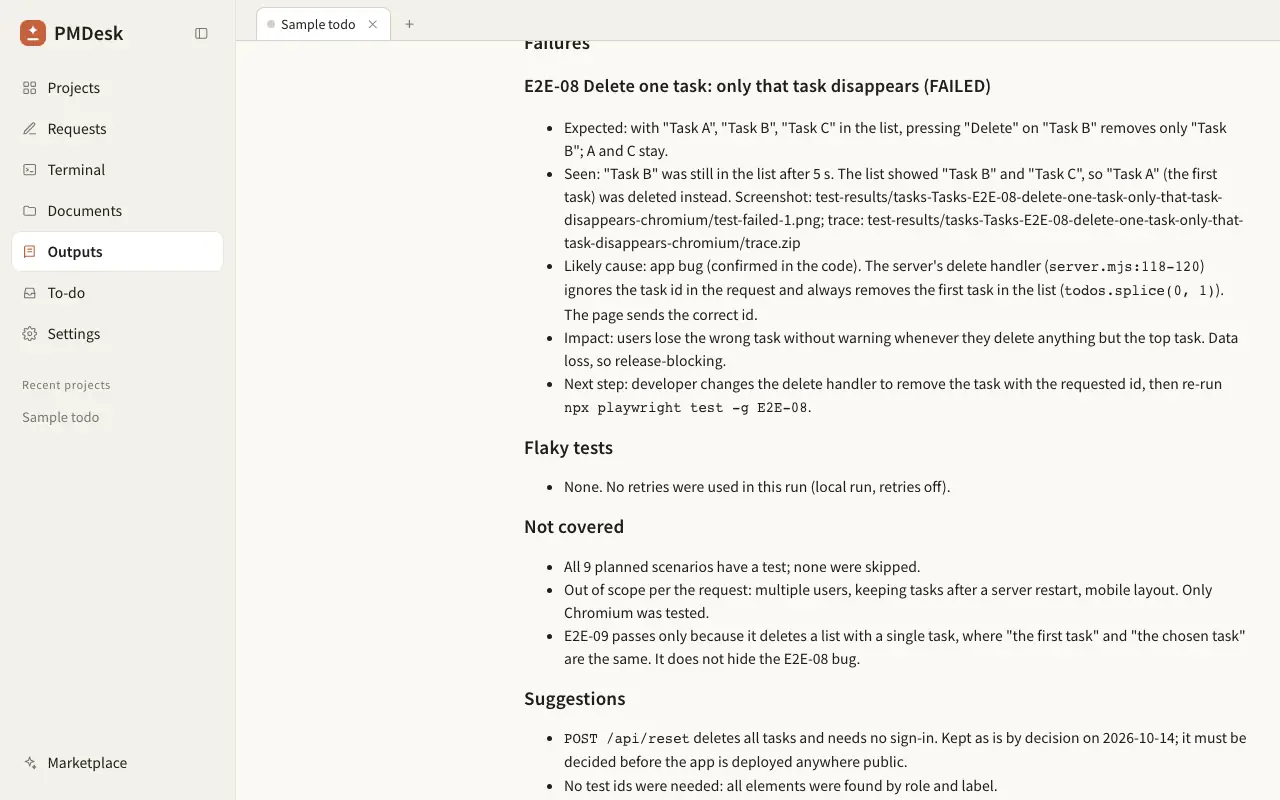
reports/e2e-YYYY-MM-DD.md): a results table with timings and the first error of each failure, then an analysis of every failure (app bug, wrong expectation or test issue) with the next step.
How it works
- The agent reads the files you point to, your PMDesk requests and the README, and writes the test plan. You review and edit it in PMDesk.
- It checks whether Playwright is installed. If not, it asks before it installs
@playwright/testand the Chromium browser. - It writes the tests, runs them and produces the JSON results.
- A small Node script (no dependencies) turns the results into the Markdown table, and the agent adds the failure analysis.
In our test sample, a small to-do web app with a planted bug in delete, all three runs wrote a plan, ran the Playwright tests and reported the failing delete scenario as an app bug, with numbers that matched the results file.
Good to know
- It does not change your application code. If tests need a
data-testidor a seed endpoint, it lists that as a suggestion. - It never writes passwords into test files; credentials come from environment variables.
- Requires Node.js 20 or later. Works with Claude Code and Codex.
- Need a manual test specification or an Excel test spec (テスト仕様書) instead? Use the Test Scenarios skill.
E2E Test は、リリース前に Web アプリの主要な操作を実際のブラウザで確認するための E2E テスト自動化スキルです。エージェントが要件を読み、テスト仕様書を提案し、あなたの承認を待ってから、テストコードの作成と実行までを行います。
成果物
- テスト仕様書(
docs/test-plan-e2e.md):シナリオ、事前条件、テストデータ、期待結果をまとめます。コードを読まない方でもレビューできます。 - 承認済みの仕様書に沿った Playwright テスト:ロールやラベルで要素を指定し、固定待機(sleep)は使いません。ログインは一度だけ行い、全テストで使い回します。
- 合否レポート(
reports/e2e-YYYY-MM-DD.md):結果一覧(実行時間・最初のエラー付き)と、失敗ごとの原因分析(アプリの不具合、期待値の誤り、テスト側の問題)と次の対応を出力します。
進め方
- 指定したファイル、PMDesk のリクエスト、README を読み、テスト仕様書を作成します。PMDesk 上で確認・修正できます。
- Playwright が入っているか確認します。未導入の場合は、
@playwright/testと Chromium をインストールしてよいか先に質問します。 - テストを書いて実行し、JSON の結果を出力します。
- 依存パッケージなしの Node スクリプトで結果を Markdown の表にし、エージェントが失敗の分析を追記します。
検証用のサンプル(削除機能に不具合を仕込んだ小さな ToDo アプリ)では、スキルありの 3 回とも、仕様書を作成し、Playwright テストを実行し、削除シナリオの失敗をアプリの不具合として報告しました。レポートの件数も結果ファイルと一致しました。
ご注意
- アプリ本体のコードは変更しません。
data-testidやテスト用データの投入口が必要な場合は、提案としてレポートに書きます。 - パスワードはテストコードに書かず、環境変数から読み込みます。
- Node.js 20 以上が必要です。Claude Code と Codex で使えます。
- 手動テスト用のテスト仕様書(Excel)が必要な場合は、Test Scenarios スキルを使ってください。
How to use使い方
- Open the PMDesk app, go to Marketplace, open this skill and press Install.PMDesk アプリで「マーケットプレイス」を開き、このスキルを開いて「インストール」を押す
- Choose this project or this Mac.「このプロジェクト」か「このMac」を選ぶ
- Ask Claude Code or Codex to use the skill, then review the result in PMDesk.Claude Code または Codex にこのスキルを使うよう頼み、結果を PMDesk で確認する
Requirements必要なもの
- PMDesk (license or trial)PMDesk(ライセンスまたはトライアル)
- Claude Code or CodexClaude Code または Codex
- Node.js 20 or laterNode.js 20 以上
Scripts in this skill含まれるスクリプト
scripts/summarize-results.mjs
The agent runs these only when it uses the skill, and asks for your permission first.エージェントはこのスキルを使うときにだけ実行し、実行前に許可を求めます。
FAQ
Do I need Playwright installed already?
No. The skill checks your project first. If Playwright is missing, it asks for your approval before it runs npm i -D @playwright/test and npx playwright install chromium. It never installs anything globally. You only need Node.js 20 or later.
What if my app needs a login?
The skill writes one setup test that signs in and saves the session with Playwright's storageState, and all other tests reuse it. The email and password are read from environment variables that you set, so no credentials are written to files. Use a test account, not a real one.
Can I run the tests in CI?
Yes. The tests are normal Playwright tests, so npx playwright test works in GitHub Actions or any CI. Install the browser with npx playwright install --with-deps chromium and upload the playwright-report/ folder as an artifact. The skill itself does not edit your CI configuration.
Does it change my application code?
No. It only adds test files, a Playwright config if you have none, the test plan and the report. If a page has no stable way to select an element, it suggests adding a data-testid and leaves the decision to you.
Does it work with Codex as well as Claude Code?
Yes. The skill is a SKILL.md with a short Node script, so any agent that supports agent skills can follow it, including Claude Code and Codex.
Why does it ask me to review a test plan first?
Tests written from a wrong assumption pass for the wrong reasons. The plan lists each scenario and its expected result in plain language, so you or a reviewer can correct it before any code is written.
Playwright は事前にインストールしておく必要がありますか?
いいえ、不要です。スキルがまずプロジェクトを確認し、Playwright が無い場合は npm i -D @playwright/test と npx playwright install chromium を実行してよいか、先に質問します。グローバルにはインストールしません。必要なのは Node.js 20 以上だけです。
ログインが必要なアプリでも E2E テストを自動化できますか?
できます。ログインしてセッションを Playwright の storageState に保存するセットアップ用テストを 1 つ作り、他のテストはそれを使い回します。メールアドレスとパスワードはあなたが設定する環境変数から読み込むため、ファイルには書きません。本番の実アカウントではなく、テスト用アカウントを使ってください。
CI(GitHub Actions など)でも実行できますか?
できます。通常の Playwright テストなので、npx playwright test がそのまま使えます。CI では npx playwright install --with-deps chromium でブラウザを入れ、playwright-report/ を成果物として保存してください。スキル自体は CI の設定ファイルを変更しません。
アプリのソースコードを書き換えますか?
いいえ。追加するのはテストファイル、(無ければ)Playwright の設定、テスト仕様書、レポートだけです。要素を安定して指定できない画面があれば、data-testid の追加を提案として書き、採用するかはあなたが決めます。
Claude Code だけでなく Codex でも使えますか?
はい。SKILL.md と小さな Node スクリプトだけで構成されているため、Agent Skills に対応したエージェントであれば Claude Code でも Codex でも使えます。
最初にテスト仕様書の確認が必要なのはなぜですか?
誤った前提で書いたテストは、間違った理由で成功してしまうからです。テスト仕様書には各シナリオと期待結果を平易な言葉で書くので、コードを書く前にあなたやレビュアーが修正できます。