Security Check: pre-release security review for Claude Code and Codexセキュリティチェック: リリース前の脆弱性診断(Claude Code / Codex 対応)
Security Check is a free skill for PMDesk users that reviews your repository before release: leaked secrets, vulnerable dependencies and the OWASP Top 10, with a severity-ranked Markdown report. Made for tech leads and solo developers; works with Claude Code and Codex.Security Check は、リリース前にリポジトリのセキュリティチェックを行う PMDesk ユーザー向けの無料スキルです。秘密情報の漏えい、脆弱性のある依存パッケージ、OWASP Top 10 を診断し、重大度順の Markdown レポートを出力します。Claude Code / Codex で動作します。
Free — no extra charge. Install it from the PMDesk app.無料(追加料金なし)。PMDesk アプリからインストールできます。
See it in action実際の出力例
Who it's forこんな方に
What it doesできること
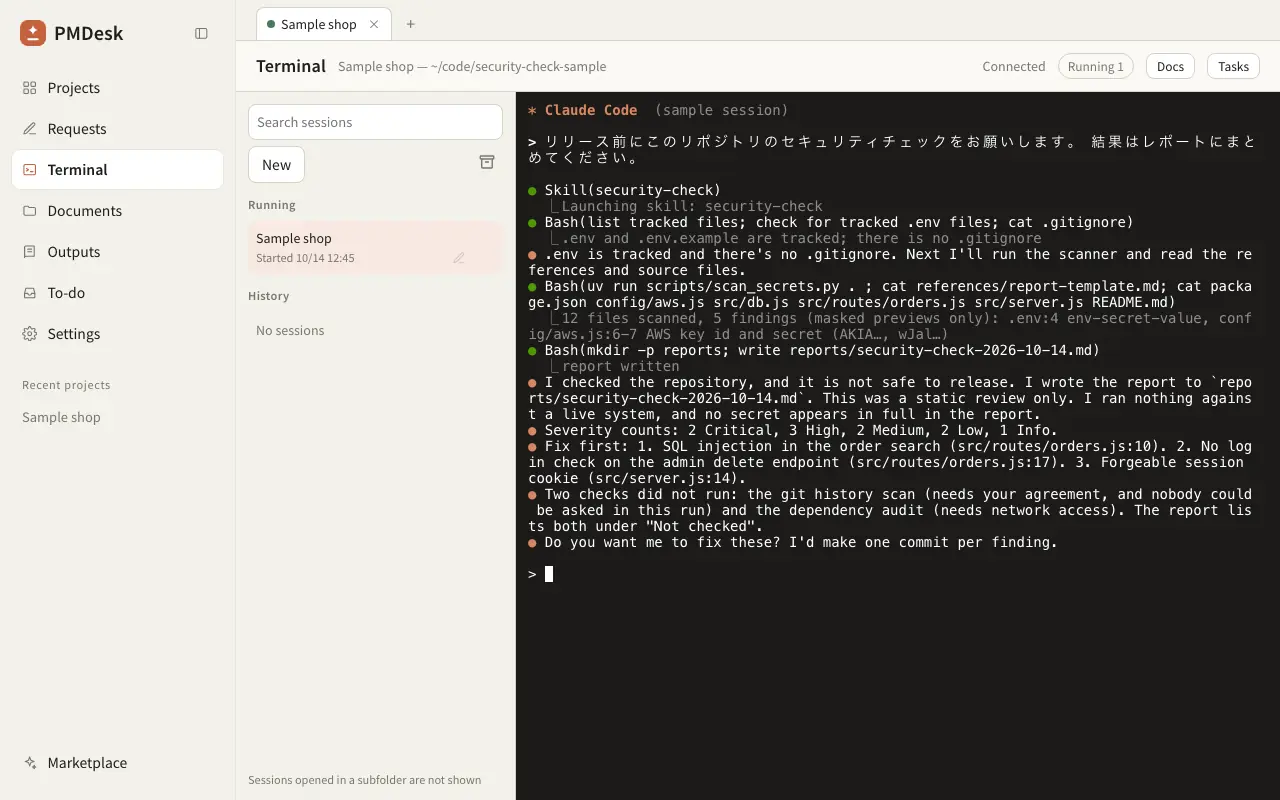
Security Check turns your AI coding agent into a pre-release security reviewer. It reads the real code in your repository, runs the checks that are safe to run, and writes a report that a project lead or PM can read without opening the code.
What you get:
- Scans the working tree for leaked secrets: AWS keys, GitHub / Slack / Stripe tokens, private keys, JWTs and
.envfiles with real values. The scan runs locally and every secret is masked in the output. - Optionally searches git history for secrets that were committed once and deleted later.
- Audits dependencies with the tool that fits your stack (
npm audit,pnpm audit,pip-audit). The agent asks before it runs anything that uses the network. - Reviews the code against an OWASP Top 10 checklist: access control, injection, authentication, SSRF, file upload, CORS and headers, cryptography, logging and CI / Docker configuration.
- Writes
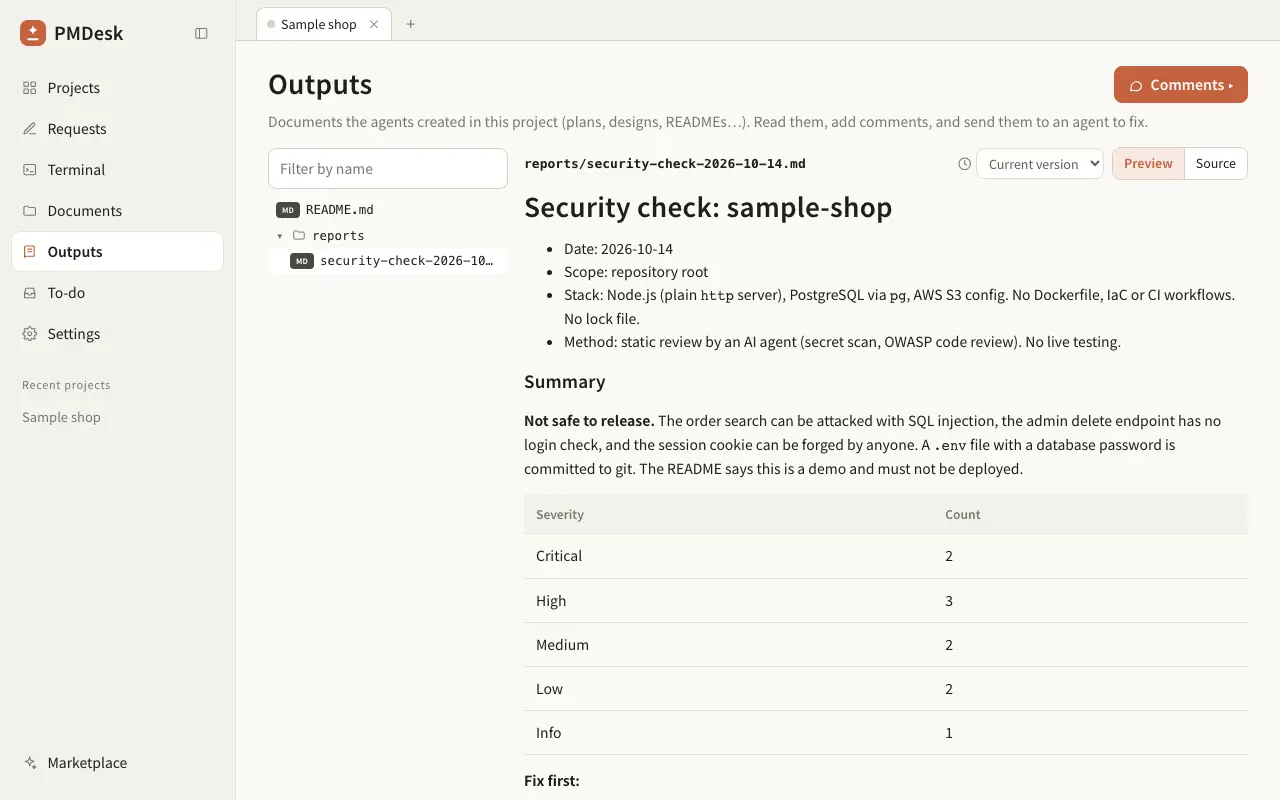
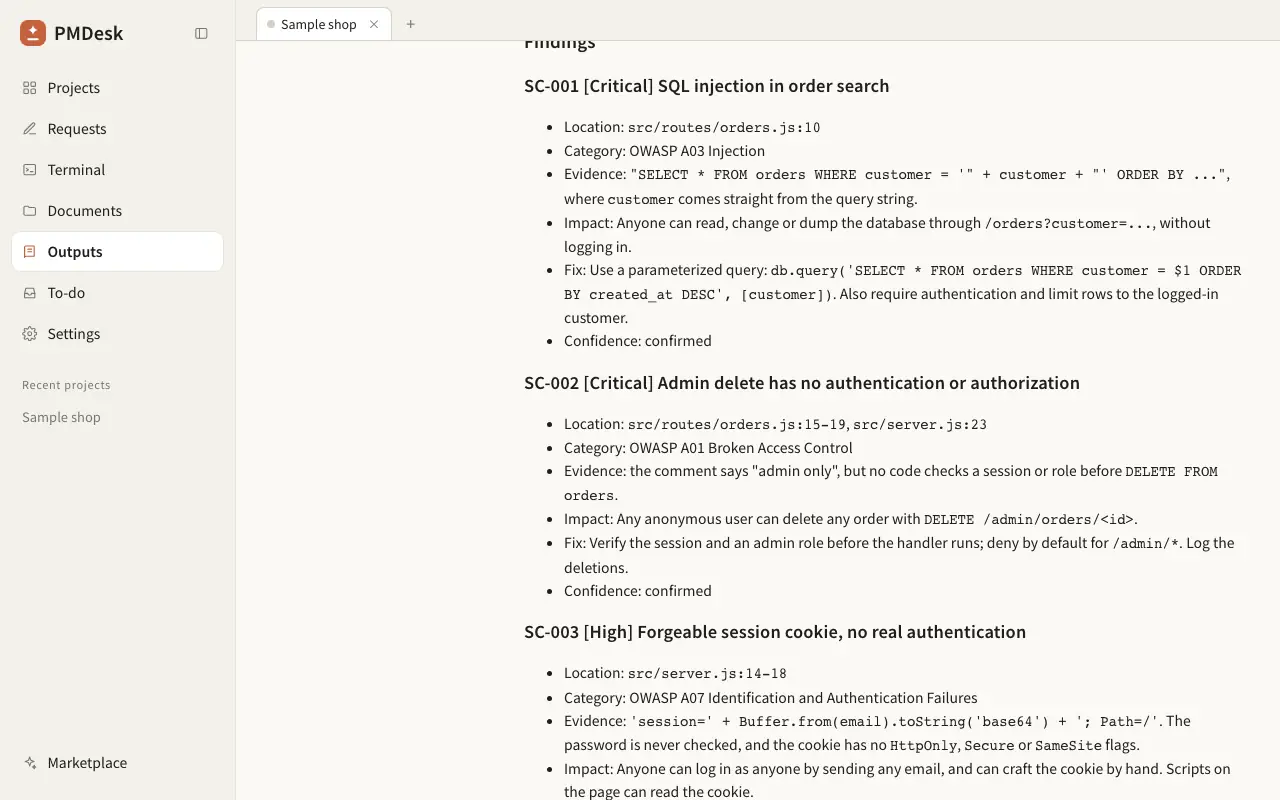
reports/security-check-YYYY-MM-DD.md. Every finding has a severity,file:line, evidence, impact and a concrete fix, plus a list of what was not checked.
In our test sample, a small web app with six planted problems, all three runs reported the issues we checked for, including SQL built by string concatenation, an admin route with no authorization check and a tracked .env file, each with a severity and the file it was in.
It reads local files only and reports problems; it never edits code unless you ask. The agent asks before it installs anything or uses the network. Run it together with the E2E Test skill for a complete pre-release check.
Security Check は、AI コーディングエージェントを「リリース前のセキュリティレビュー担当」にするスキルです。リポジトリの実際のコードを読み、安全に実行できるチェックだけを実行し、コードを開かなくても読めるレポートにまとめます。
できること:
- 作業ツリーの秘密情報の漏えいを検出します。AWS キー、GitHub / Slack / Stripe のトークン、秘密鍵、JWT、値が入った
.envが対象です。スキャンはローカルで完結し、出力ではすべて伏せ字になります。 - 希望すれば、過去にコミットして後で消した秘密情報を git 履歴から探します。
- 依存パッケージの脆弱性診断を、技術スタックに合うツール(
npm audit、pnpm audit、pip-audit)で行います。ネットワークを使うコマンドは、実行前にエージェントが確認します。 - OWASP Top 10 に沿ってコードをレビューします。アクセス制御、インジェクション、認証、SSRF、ファイルアップロード、CORS とヘッダ、暗号、ログ、CI / Docker の設定が対象です。
reports/security-check-YYYY-MM-DD.mdを出力します。指摘ごとに重大度、ファイル:行、根拠、影響、具体的な修正方法を記載し、未確認の範囲も明記します。
検証用のサンプル(問題を 6 件仕込んだ小さな Web アプリ)では、スキルありの 3 回とも、文字列連結で組み立てた SQL、認可チェックのない管理者向けルート、Git で追跡されている .env など、確認対象とした問題を重大度とファイル名つきで報告しました。
ローカルのファイルを読むだけで、問題を報告するにとどまり、頼まない限りコードは書き換えません。インストールやネットワークを使う操作の前には、エージェントが必ず確認します。リリース前のチェックは、E2E Test スキルと組み合わせるとより確実です。
How to use使い方
- Open the PMDesk app, go to Marketplace, open this skill and press Install.PMDesk アプリで「マーケットプレイス」を開き、このスキルを開いて「インストール」を押す
- Choose this project or this Mac.「このプロジェクト」か「このMac」を選ぶ
- Ask Claude Code or Codex to use the skill, then review the result in PMDesk.Claude Code または Codex にこのスキルを使うよう頼み、結果を PMDesk で確認する
Requirements必要なもの
- PMDesk (license or trial)PMDesk(ライセンスまたはトライアル)
- Claude Code or CodexClaude Code または Codex
- uv
- Git
Scripts in this skill含まれるスクリプト
scripts/scan_secrets.py
The agent runs these only when it uses the skill, and asks for your permission first.エージェントはこのスキルを使うときにだけ実行し、実行前に許可を求めます。
FAQ
Does Security Check send my code anywhere?
No. The secret scanner runs locally and has no network access. Only dependency audits (npm audit, pip-audit) contact a package registry, and they send package names and versions, not your source code. The agent asks before it runs them. Note that your AI agent itself (Claude Code or Codex) reads the files it reviews, as it always does.
What do I need to install?
uv and git. The scanner is a single Python script with no extra packages. For dependency audits the agent uses npm, pnpm or uvx pip-audit if your project needs them, and asks before installing or running anything.
Will it change my code?
No. It only reads the repository and writes one report file, by default reports/security-check-YYYY-MM-DD.md. It offers to fix findings afterwards and waits for your yes.
How is it different from a commercial SAST tool?
It is a review by your AI agent, not a rule engine with a vulnerability database. It reads the code in context, finds logic problems such as missing authorization checks, and explains them in plain language. It does not replace a penetration test or a SAST tool required by compliance. Use it as a fast first pass before release.
Does it work with Codex?
Yes. The skill is plain instructions plus a Python script, so it works with Claude Code and Codex. Install it from PMDesk and ask the agent for a security check.
Is it free?
Yes. Security Check is free for PMDesk users, with no extra charge. You install it from the PMDesk app.
コードが外部に送信されることはありますか?
秘密情報のスキャンはローカルで動作し、ネットワークには接続しません。ネットワークを使うのは依存パッケージの診断(npm audit、pip-audit)だけで、送られるのはパッケージ名とバージョンであり、ソースコードではありません。実行前にエージェントが確認します。なお、レビュー対象のファイルは通常どおり AI エージェント(Claude Code / Codex)が読み取ります。
何をインストールする必要がありますか?
uv と git です。スキャナは追加パッケージ不要の Python スクリプト 1 本です。依存パッケージの診断では、プロジェクトに応じて npm、pnpm、uvx pip-audit を使いますが、インストールや実行の前に必ず確認します。
コードを勝手に書き換えますか?
いいえ。リポジトリを読み取り、レポートを 1 ファイル(既定は reports/security-check-YYYY-MM-DD.md)出力するだけです。修正は提案しますが、あなたが了承するまで実行しません。
市販の SAST ツールとの違いは何ですか?
ルールと脆弱性データベースで機械的に検出するツールではなく、AI エージェントが文脈を読んでレビューします。認可チェックの漏れのようなロジックの問題も見つけ、平易な言葉で説明します。ただし、ペネトレーションテストや、コンプライアンス上必要な SAST の代わりにはなりません。リリース前の一次チェックとして使ってください。
Codex でも使えますか?
はい。このスキルは手順書と Python スクリプトだけなので、Claude Code でも Codex でも動きます。PMDesk からインストールし、エージェントに「セキュリティチェックをして」と頼んでください。
無料ですか?
はい。Security Check は PMDesk ユーザーなら追加料金なしで無料で使えます。PMDesk アプリからインストールします。