Test Scenarios: test cases and a test specification from requirementsテスト仕様書・テストケースの作成(要件から Excel 出力)
Test Scenarios is a skill for PMs and developers (free for PMDesk users) that builds a test specification (テスト仕様書) from requirements: test cases with viewpoints, steps and expected results, a traceability matrix showing uncovered requirements, and an Excel export. It runs with Claude Code and Codex.テスト仕様書とテストケースを要件から作成するスキルです(PMDesk ユーザーは無料)。観点・手順・期待結果・優先度を持つテストケースと、要件がどのケースで確認されるかを示すトレーサビリティを作り、結合テストや受入テストで使える Excel に出力します。曖昧な要件は質問として分け、Claude Code と Codex で使えます。
Free — no extra charge. Install it from the PMDesk app.無料(追加料金なし)。PMDesk アプリからインストールできます。
See it in action実際の出力例
Who it's forこんな方に
- Project leadsプロジェクトリード
- FDE / contract developmentFDE・受託開発
- PMs and reviewersPM・レビュアー
- Solo developers個人開発者
What it doesできること
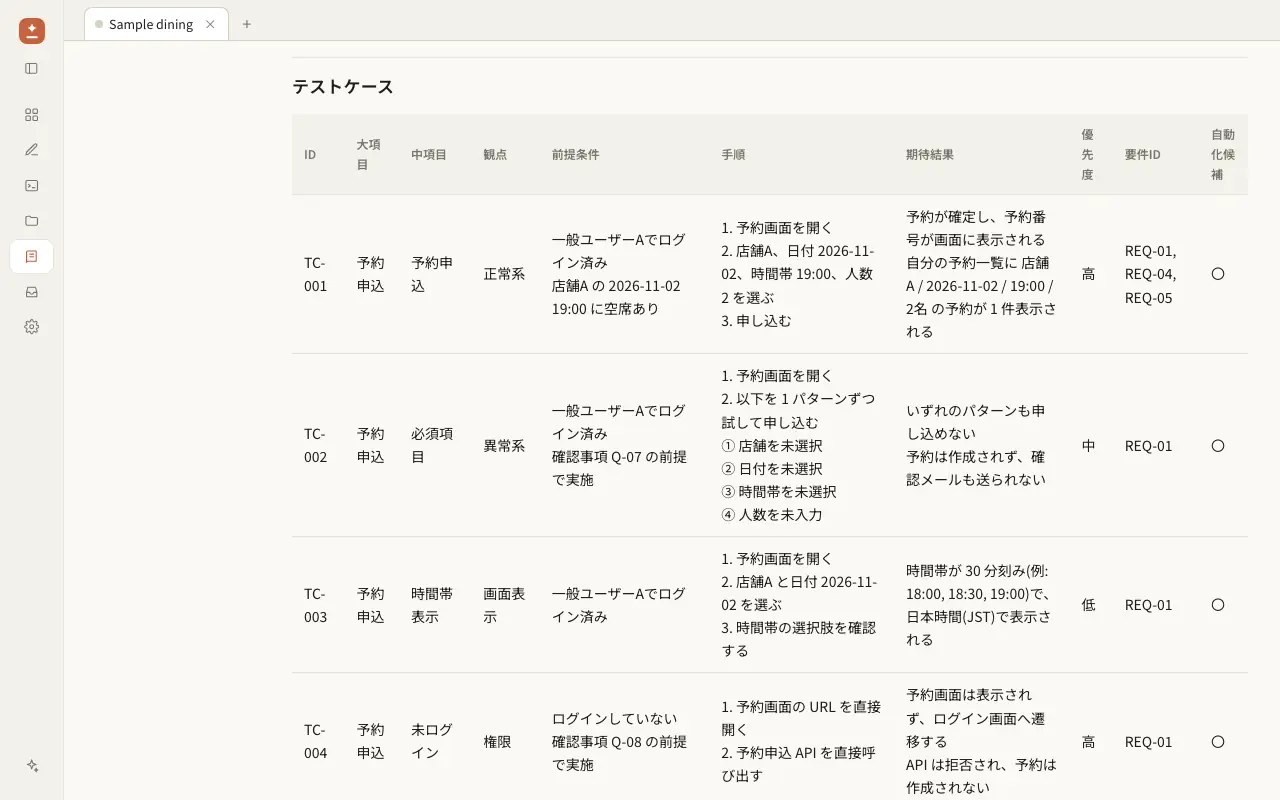
Test Scenarios turns a requirements document into a test specification that you can send to a customer or hand to QA: an integration or acceptance test plan with cases written from a checklist of test viewpoints, not only the happy path. The agent reads the requirements, writes the cases, checks that every requirement is covered, and exports an Excel workbook.
Files it creates
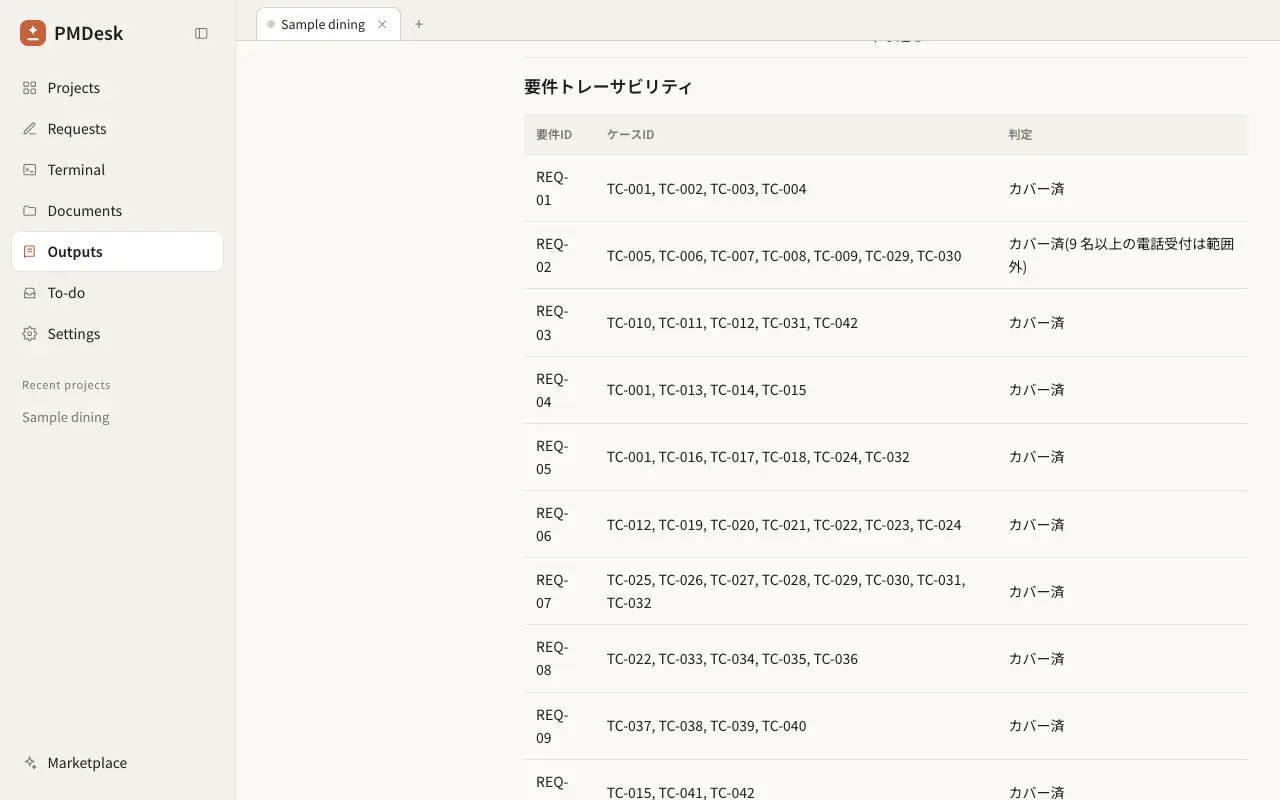
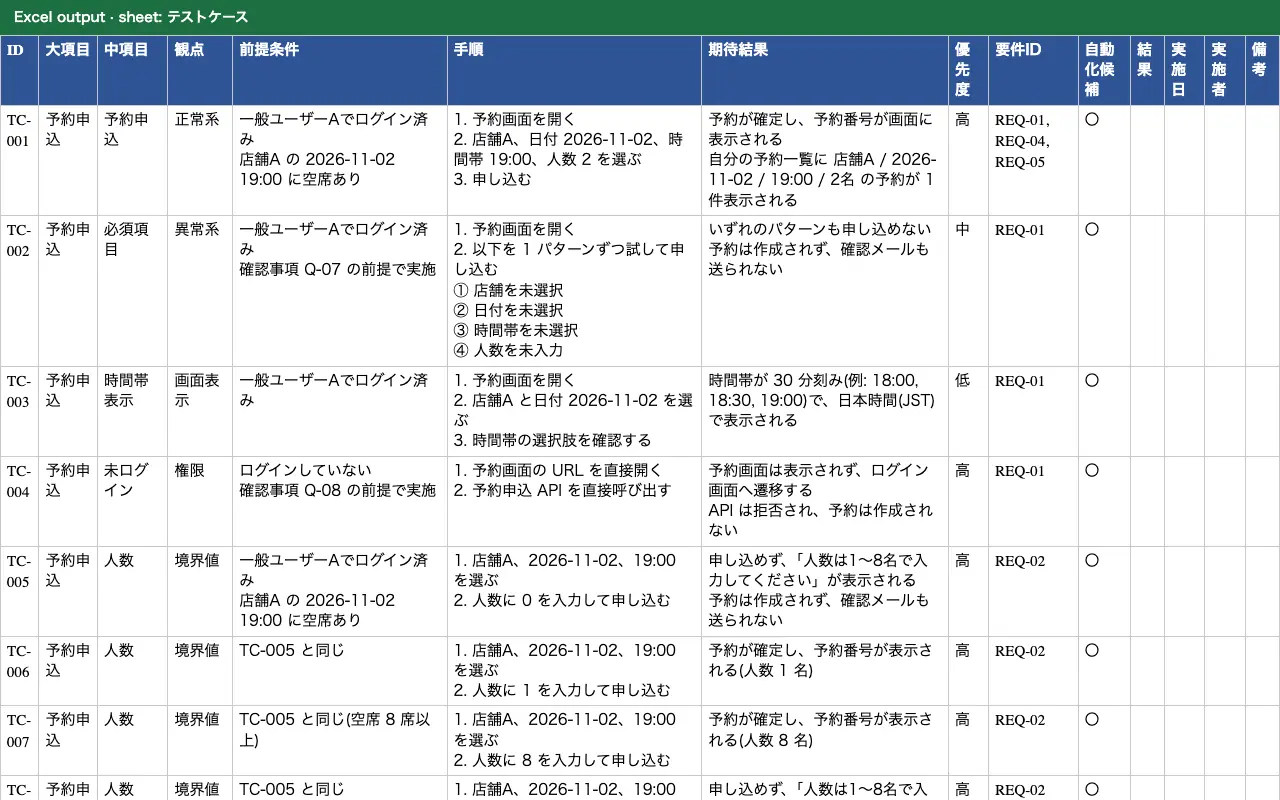
docs/test/test-spec-<feature>.md: the source of truth. It has the requirement list, a table of cases (ID | category | subcategory | viewpoint | precondition | steps | expected result | priority | requirement ID | automation candidate), the traceability table, the requirements that have no case, and a table of questions for anything unclear.docs/test/テスト仕様書_<feature>_YYYYMMDD.xlsx: the same cases for QA, with a case sheet (and empty result, date, tester and notes columns), a traceability sheet, a viewpoint sheet and an open-questions sheet (with an empty answer column for the client). The header row is frozen and cells wrap.
How the cases are designed
- It lists the requirements with their IDs, using the IDs in your document.
- For each one it goes through viewpoints: normal flow, boundary values (the limit and one step each side), equivalence classes, errors, permissions for every role, state transitions and concurrency.
- A vague rule such as "when unavoidable" is not guessed. It goes into the question table with the assumption the cases use if nobody answers.
- A small Python script checks the case IDs are unique and every requirement ID exists, then writes the workbook.
In our test sample, a reservation screen with 10 numbered requirements, all three runs gave every requirement at least one case, wrote boundary cases for 0, 1, 8 and 9 guests and for 23 hours, exactly 24 hours and 25 hours before the cancellation deadline, tested all three roles, and asked a question about the vague rule "when unavoidable". A single run without the skill missed that question and did not produce the result, date, tester and notes columns.
Limits
- It writes test documents and does not run the tests. Cases marked as automation candidates can be passed to the E2E Test skill, which writes Playwright tests.
- It does not edit your customer's own Excel template. It tells you the columns so you can copy the cases across.
- The first run downloads one Python package (
openpyxl) withuv; the agent tells you before it does.
Test Scenarios は、要件定義書などの要件から、顧客に提出できるテスト仕様書を作成するスキルです。結合テスト・受入テスト向けに、正常系だけでなくテスト観点のチェックリストに沿ってケースを書き、要件の漏れを確認して Excel に出力します。
作成するファイル
docs/test/test-spec-<機能名>.md:元になる Markdown です。要件一覧、テストケース表(ID | 大項目 | 中項目 | 観点 | 前提条件 | 手順 | 期待結果 | 優先度 | 要件ID | 自動化候補)、トレーサビリティ、ケースがない要件、曖昧な点の質問表が入ります。docs/test/テスト仕様書_<機能名>_YYYYMMDD.xlsx:QA が使う Excel です。テストケース、要件トレーサビリティ、観点、確認事項(回答欄つき)のシートがあり、ケースのシートには結果・実施日・実施者・備考の空欄が付きます。見出し行は固定、セルは折り返し済みです。
ケースの作り方
- 要件書にある要件ID を使って要件を一覧にします。
- 要件ごとに、正常系、境界値(上限・下限とその前後)、同値分割、異常系、全ロールの権限、状態遷移、同時実行の観点で確認します。
- 「やむを得ない場合」のような曖昧な記述は推測しません。質問表に書き、回答がない場合に使う前提を添えます。
- Python の小さなスクリプトが、ケースID の重複と存在しない要件ID を検査してから Excel を書き出します。
検証用のサンプル(10 件の要件ID を持つ予約画面)では、スキルありの 3 回とも、すべての要件に 1 件以上のケースを付け、人数 0・1・8・9 の境界値と、キャンセル期限の 23 時間前・ちょうど 24 時間・25 時間前のケース、3 つのロール全部の権限確認を書き、曖昧な「やむを得ない場合」の規定を質問として挙げました。スキルなしの 1 回では、この質問がなく、結果・実施日・実施者・備考の空欄列もありませんでした。
ご注意
- 作成するのはテストの文書で、テストの実行はしません。自動化できるケースは「自動化候補」に印を付けるので、E2E Test スキルに渡して Playwright テストにできます。
- 顧客指定の Excel テンプレートは編集しません。列の構成をお伝えするので、ケースを転記してください。
- 初回のみ
uvで Python パッケージ(openpyxl)を 1 つダウンロードします。実行前にエージェントがお知らせします。
How to use使い方
- Open the PMDesk app, go to Marketplace, open this skill and press Install.PMDesk アプリで「マーケットプレイス」を開き、このスキルを開いて「インストール」を押す
- Choose this project or this Mac.「このプロジェクト」か「このMac」を選ぶ
- Ask Claude Code or Codex to use the skill, then review the result in PMDesk.Claude Code または Codex にこのスキルを使うよう頼み、結果を PMDesk で確認する
Requirements必要なもの
- PMDesk (license or trial)PMDesk(ライセンスまたはトライアル)
- Claude Code or CodexClaude Code または Codex
- uv
Scripts in this skill含まれるスクリプト
scripts/cases_xlsx.py
The agent runs these only when it uses the skill, and asks for your permission first.エージェントはこのスキルを使うときにだけ実行し、実行前に許可を求めます。
FAQ
How is this different from the E2E Test skill?
Test Scenarios writes the test specification, the document with cases, steps and expected results that QA runs by hand and that customers review. E2E Test writes and runs automated Playwright tests. Use them together: the cases marked as automation candidates can be handed to E2E Test.
Does it make a traceability matrix?
Yes. Every case carries the ID of the requirement it checks. The workbook has a traceability sheet that lists, for each requirement, the case IDs and whether it is covered. Requirements with no case are listed in the Markdown file and in the final report.
Can I use my company's Excel template?
The skill does not edit your template. It writes its own workbook with a fixed set of columns, so you copy the cases across. If your template needs a different column order, tell the agent and it will adjust the Markdown table before exporting.
Can testers record results in the file?
Yes. The case sheet has empty Result, Date, Tester and Notes columns for QA to fill in. The skill does not run the tests and does not fill them in.
What happens when a requirement is unclear?
The agent does not guess the expected result. It adds a question (target, question, and the assumption used if nobody answers) to the specification and marks the dependent cases. This is how the test viewpoints surface gaps in the requirements before testing starts.
Is it free, and does it work with Codex as well as Claude Code?
It is free for PMDesk users. The skill is a SKILL.md, a checklist of test viewpoints and one Python script, so Claude Code, Codex or any agent that supports agent skills can follow it. You need uv installed.
E2E Test スキルとは何が違いますか?
Test Scenarios が作るのは、QA が手作業で実施し、顧客もレビューするテスト仕様書(ケース・手順・期待結果)です。E2E Test は Playwright の自動テストを書いて実行します。併用でき、「自動化候補」に印を付けたケースを E2E Test に渡せます。
要件とテストケースの対応表(トレーサビリティ)は作れますか?
作れます。各ケースに、確認する要件ID を必ず付けます。Excel には要件ごとにケースID と「カバー済・未カバー」を並べたシートがあり、ケースがない要件は Markdown と最後の報告にも出ます。
会社や顧客指定のテスト仕様書テンプレート(Excel)は使えますか?
テンプレート自体は編集しません。決まった列構成の Excel を新しく作るので、ケースを転記してください。列の順番を変えたい場合は、エクスポート前に Markdown の表を調整するようエージェントに伝えれば対応します。
テストの結果も記録できますか?
記録欄は付きます。ケースのシートに「結果・実施日・実施者・備考」の空欄があり、QA が入力します。スキルがテストを実行して結果を埋めることはありません。
要件が曖昧なときはどうなりますか?
期待結果を推測して書くことはしません。質問表に「対象・質問・回答がない場合の前提」を追加し、その前提に依存するケースに印を付けます。テスト観点で確認することで、テスト開始前に要件の抜けが見つかります。
無料ですか? Claude Code だけでなく Codex でも使えますか?
PMDesk ユーザーは無料です。SKILL.md、テスト観点のチェックリスト、Python スクリプト 1 つで構成されているため、Agent Skills に対応したエージェントなら Claude Code でも Codex でも使えます。uv のインストールが必要です。