Screen Flow Diagram from your frontend routes (draw.io)画面遷移図の作成(ルーティングと画面一覧から draw.io)
Screen Flow Diagram is a skill (free for PMDesk users) for Claude Code and Codex that reads your Next.js, Nuxt, React Router or Vue Router routes, or a screen list, and draws an editable draw.io screen flow diagram marking login-required screens, modals and screens missing from code or spec.画面遷移図の作成スキルです(PMDesk ユーザーは無料、Claude Code / Codex 対応)。Next.js・Nuxt・React Router・Vue Router のルーティングや画面一覧を読み、ログインが必要な画面やモーダルを区別した、編集できる draw.io の画面遷移図を自動生成します。仕様書にしかない画面、コードにしかない画面も分かります。
Free — no extra charge. Install it from the PMDesk app.無料(追加料金なし)。PMDesk アプリからインストールできます。
See it in action実際の出力例
Who it's forこんな方に
What it doesできること
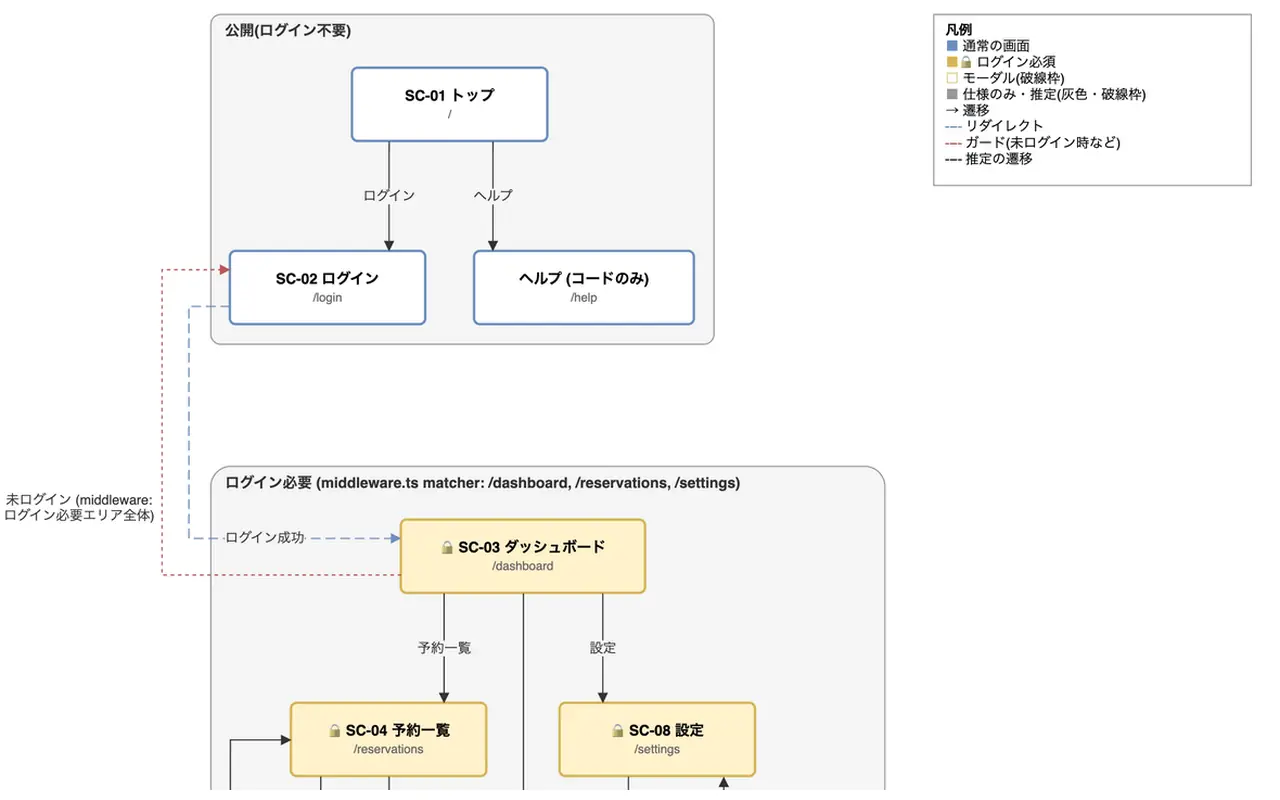
Screen Flow Diagram turns the routes and links in your frontend code, or a screen list in your documents, into a screen flow diagram (画面遷移図) that a client can open and edit in draw.io, and writes down where every screen and arrow came from.
What you get:
- docs/design/screen-flow.drawio: one box per screen with its name and route, arrows labelled with what the user does, boxes grouped by area. Screens that need a login carry a lock, modals have a dashed border, redirects and login guards have their own arrow styles.
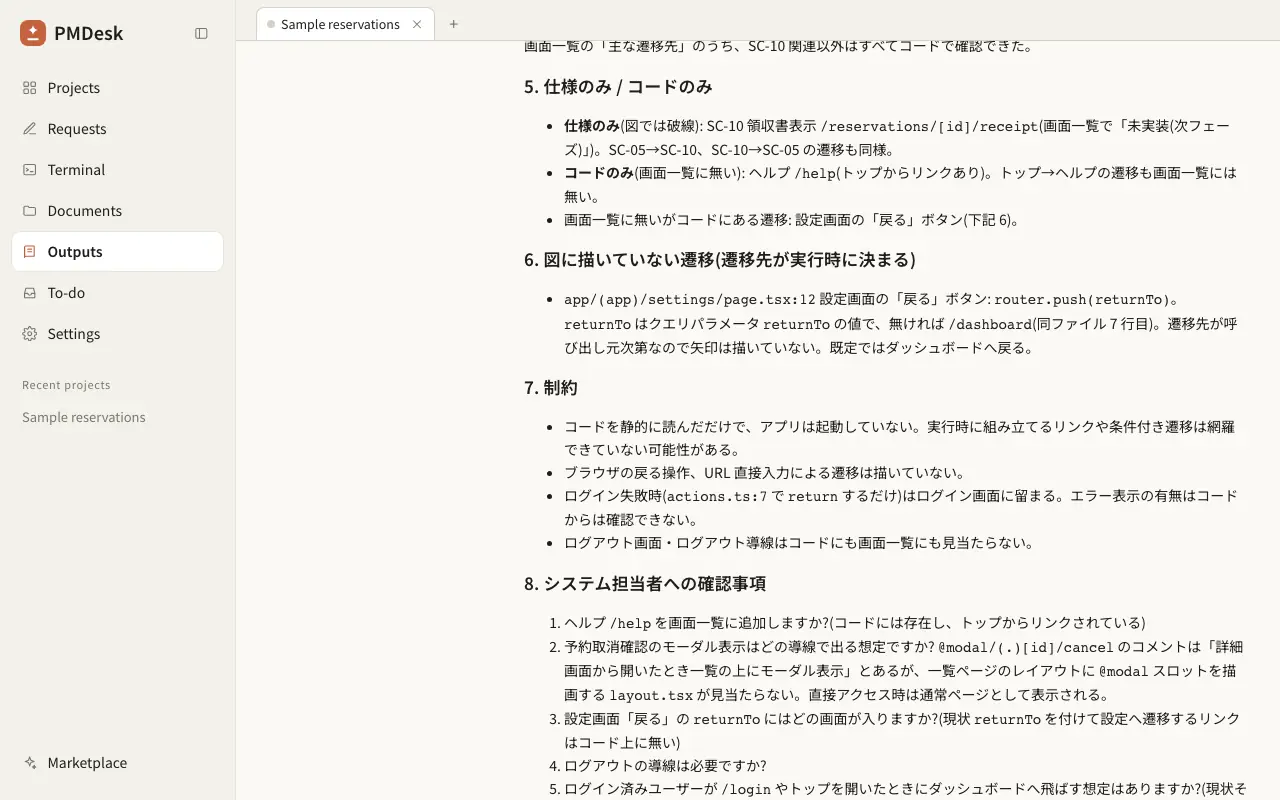
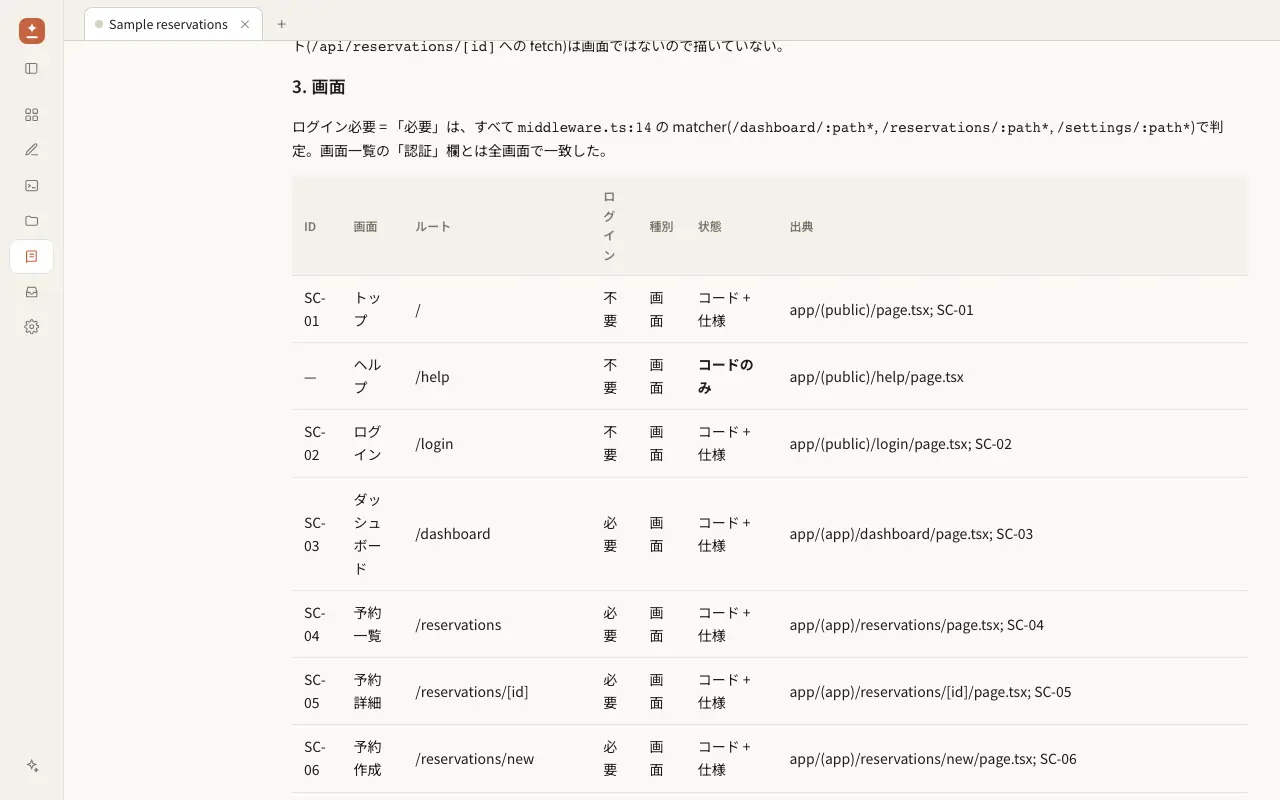
- docs/design/screen-flow.md: a screen table and a transition table with the file and line each came from, the screens that exist only in the spec or only in the code, the navigation it could not resolve, and questions for the system owner.
- A PNG, only if you say yes.
How it works: a small Node script reads the file-based routes (Next.js app and pages router, Nuxt), static route arrays (React Router, Vue Router) and the navigation in your code (Link, router.push, redirect, middleware guards). The agent compares the result with your screen list, builds the model, and a deterministic layout step writes the draw.io file and checks it, so you do not get boxes on top of each other or arrows that point nowhere.
Limits: it reads files only. It does not run the app or a browser, so links built at runtime and navigation that depends on data are listed as unresolved instead of being guessed. Other frameworks, or no code at all, work from the screen list or from what you tell the agent. The output is draw.io only.
In our test sample, a Next.js reservation app with 14 transitions and a screen list that includes one screen not built yet, all three runs scored full marks on our checks, both from the code and from the documents alone. Login-required screens were marked and the unbuilt screen was drawn dashed, and when working from code, navigation to a variable (router.push(returnTo)) was listed as unresolved. A single run without the skill drew overlapping shapes, did not mark the login-required screens and wrote no explanation document.
Part of a design document set: draw the data model with the ER Diagram skill, requirement-level flows with the UML Diagrams skill, and turn the screens into manual test cases with the Test Scenarios skill.
Screen Flow Diagram は、フロントエンドのルーティングやリンク、または画面一覧の文書から、お客様が draw.io で開いて編集できる画面遷移図を作り、画面と矢印それぞれの根拠を文章で残すスキルです。
できること:
- docs/design/screen-flow.drawio を出力します。画面ごとに名前とパスを書いた箱、操作を書いた矢印、エリアごとのグループ分けです。ログインが必要な画面には鍵マーク、モーダルは破線、リダイレクトとログインガードは専用の矢印で区別します。
- docs/design/screen-flow.md を出力します。画面一覧表と遷移一覧表(根拠のファイルと行を併記)、仕様書にしかない画面、コードにしかない画面、解決できなかった遷移、システム担当者への確認事項です。
- PNG は、希望があるときだけ出力します。
仕組み: Node の小さなスクリプトが、ファイルベースのルーティング(Next.js の app / pages、Nuxt)、静的なルート定義(React Router、Vue Router)、コード中の画面遷移(Link、router.push、redirect、ミドルウェアのガード)を読みます。エージェントが画面一覧と突き合わせてモデルを作り、決まった手順のレイアウトで draw.io ファイルを書き出して検査します。箱が重なったり、行き先のない矢印が残ったりしません。
制約: 読むのはファイルだけです。アプリやブラウザは動かさないため、実行時に組み立てられるリンクやデータに依存する遷移は、推測で描かずに「解決できなかった遷移」として載せます。ほかのフレームワークやコードがない場合は、画面一覧や担当者からの説明をもとに作ります。出力は draw.io のみです。
検証用のサンプル(遷移 14 本の Next.js 予約アプリと、未実装の画面を 1 つ含む画面一覧)では、コードから作る場合も文書だけから作る場合も、スキルありの 3 回とも用意したチェックを満点で通過しました。ログインが必要な画面に印が付き、未実装の画面は破線で描かれ、コードから作った場合は変数への遷移(router.push(returnTo))が「解決できなかった遷移」に載りました。スキルなしの 1 回では、図形が重なり、ログインが必要な画面に印がなく、説明書も作られませんでした。
基本設計書の一式として、データモデルは ER Diagram スキル、要件レベルの流れは UML Diagrams スキル、画面をもとにした手動テストは Test Scenarios スキルもご利用ください。
How to use使い方
- Open the PMDesk app, go to Marketplace, open this skill and press Install.PMDesk アプリで「マーケットプレイス」を開き、このスキルを開いて「インストール」を押す
- Choose this project or this Mac.「このプロジェクト」か「このMac」を選ぶ
- Ask Claude Code or Codex to use the skill, then review the result in PMDesk.Claude Code または Codex にこのスキルを使うよう頼み、結果を PMDesk で確認する
Requirements必要なもの
- PMDesk (license or trial)PMDesk(ライセンスまたはトライアル)
- Claude Code or CodexClaude Code または Codex
- Node.js 20 or laterNode.js 20 以上
- uv
Scripts in this skill含まれるスクリプト
scripts/drawio_lib.pyscripts/list_routes.mjs
The agent runs these only when it uses the skill, and asks for your permission first.エージェントはこのスキルを使うときにだけ実行し、実行前に許可を求めます。
FAQ
Which frontend frameworks does it support?
Next.js (app router and pages router), Nuxt pages, and React Router or Vue Router when the routes are written as plain object lists or JSX Route elements. For anything else, such as Angular or SvelteKit, the agent reads the code or your screen list and fills in the same model by hand, and says so in the document.
Can I draw a screen flow diagram from documents only, without code?
Yes. Give it the screen list (画面一覧), requirements or basic design document. Every screen and arrow then comes from the document and is marked as such. If a code folder is also available, it compares the two and shows screens that exist only in the spec, drawn dashed, and screens that exist only in the code.
How are login-required screens and modals shown?
A screen that needs a login has a lock and a yellow fill, and a modal has a dashed border. The lock is only set when the skill found a guard, such as a middleware matcher or an auth check in the page or the route definition, and the document names it. A page is not marked as protected just because of its name.
What happens with links that are built dynamically?
A path like /reservations/${id} is matched to the dynamic route /reservations/[id]. If the target is a variable or computed at runtime, for example router.push(returnTo), the skill does not guess a destination. It lists the file and line under unresolved in the document instead of drawing an arrow.
Can I edit the diagram afterwards, and is Mermaid supported?
The output is a normal draw.io file, so you or the client can move boxes and fix labels in draw.io. Only draw.io is produced on purpose, because that is what clients usually accept as a design document. Mermaid and PlantUML are not supported.
Does it work with Codex as well as Claude Code?
Yes. It is a standard skill (SKILL.md, a Node script and a Python layout script run with uv), so any agent that can follow a skill and run commands can use it. It asks before it downloads anything or starts draw.io to export a PNG.
対応しているフレームワークは何ですか?
Next.js(app router と pages router)、Nuxt の pages、そして、ルートがオブジェクトの配列または JSX の Route で書かれている React Router と Vue Router です。Angular や SvelteKit など、それ以外の場合は、エージェントがコードや画面一覧を読んで同じモデルを手で作り、その旨を説明書に書きます。
コードがなく、設計書だけから画面遷移図は作れますか?
作れます。画面一覧、要件定義書、基本設計書を渡してください。画面も矢印もすべて文書が根拠になり、そのように記載します。コードのフォルダもある場合は両方を突き合わせ、仕様書にしかない画面は破線で、コードにしかない画面は説明書で示します。
ログインが必要な画面やモーダルはどう表しますか?
ログインが必要な画面は鍵マークと黄色の塗り、モーダルは破線の枠です。鍵マークを付けるのは、ミドルウェアの matcher、ページやルート定義の認証チェックなど、ガードが見つかったときだけで、説明書にその根拠を書きます。画面名から保護されていると決めつけることはしません。
動的に組み立てられるリンクはどうなりますか?
/reservations/${id} のような書き方は、動的ルート /reservations/[id] への遷移として扱います。router.push(returnTo) のように行き先が変数や実行時の計算で決まる場合は、行き先を推測せず、矢印も描かずに、ファイルと行を説明書の「解決できなかった遷移」に載せます。
作った図を後から編集できますか? Mermaid には対応していますか?
出力は通常の draw.io ファイルなので、draw.io で箱を動かしたり文言を直したりできます。お客様に設計書として受け取ってもらいやすいため、出力は draw.io のみにしており、Mermaid と PlantUML には対応していません。
Claude Code だけでなく Codex でも使えますか?
使えます。標準的なスキル(SKILL.md、Node のスクリプト、uv で実行する Python のレイアウト用スクリプト)なので、スキルに従ってコマンドを実行できるエージェントなら使えます。パッケージのダウンロードや、PNG 出力のための draw.io の起動は、実行前に確認します。
Related関連
- UML Diagrams in draw.io: use case, activity, flowchart, swimlane and stateユースケース図・アクティビティ図・業務フロー図・状態遷移図を draw.io で作成
- ER Diagram from SQL Schema and Migrations (draw.io)ER図の自動生成(SQL・マイグレーション・Prisma から draw.io)
- Skills for Project leadsプロジェクトリード向けスキル
- Skills for FDE / contract developmentFDE・受託開発向けスキル
- Skills for PMs and reviewersPM・レビュアー向けスキル