UML Diagrams in draw.io: use case, activity, flowchart, swimlane and stateユースケース図・アクティビティ図・業務フロー図・状態遷移図を draw.io で作成
UML Diagrams is a skill for Claude Code and Codex that turns requirements, documents or code into editable draw.io use case, activity, flowchart, swimlane and state diagrams. Each one comes with a note separating what the source states from what was inferred. Free for PMDesk users.要件定義書やコードから、ユースケース図・アクティビティ図・フローチャート・業務フロー図・状態遷移図を、お客様が編集できる draw.io ファイルとして作るスキルです(Claude Code / Codex 対応)。図ごとに、資料に書かれた事実と推測を分けた説明書も作ります。PMDesk ユーザーは追加料金なしで使えます。
Free — no extra charge. Install it from the PMDesk app.無料(追加料金なし)。PMDesk アプリからインストールできます。
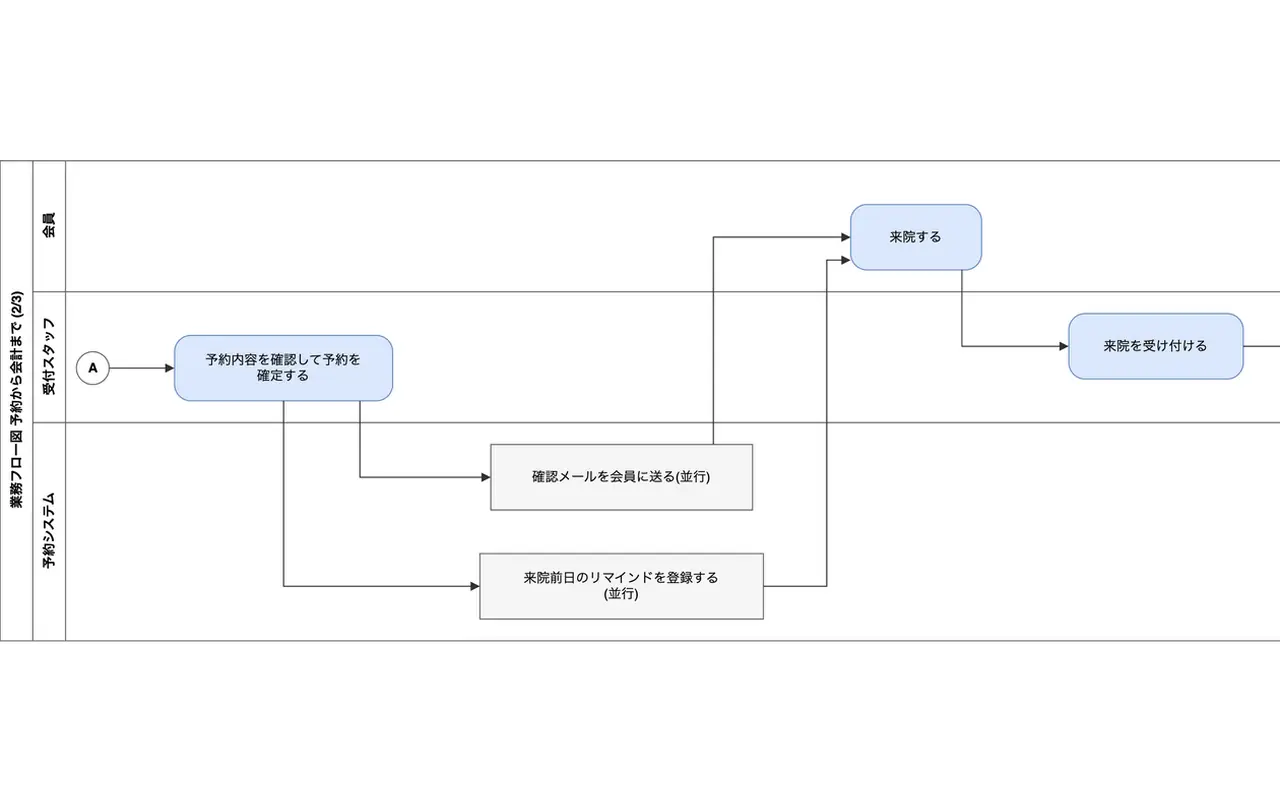
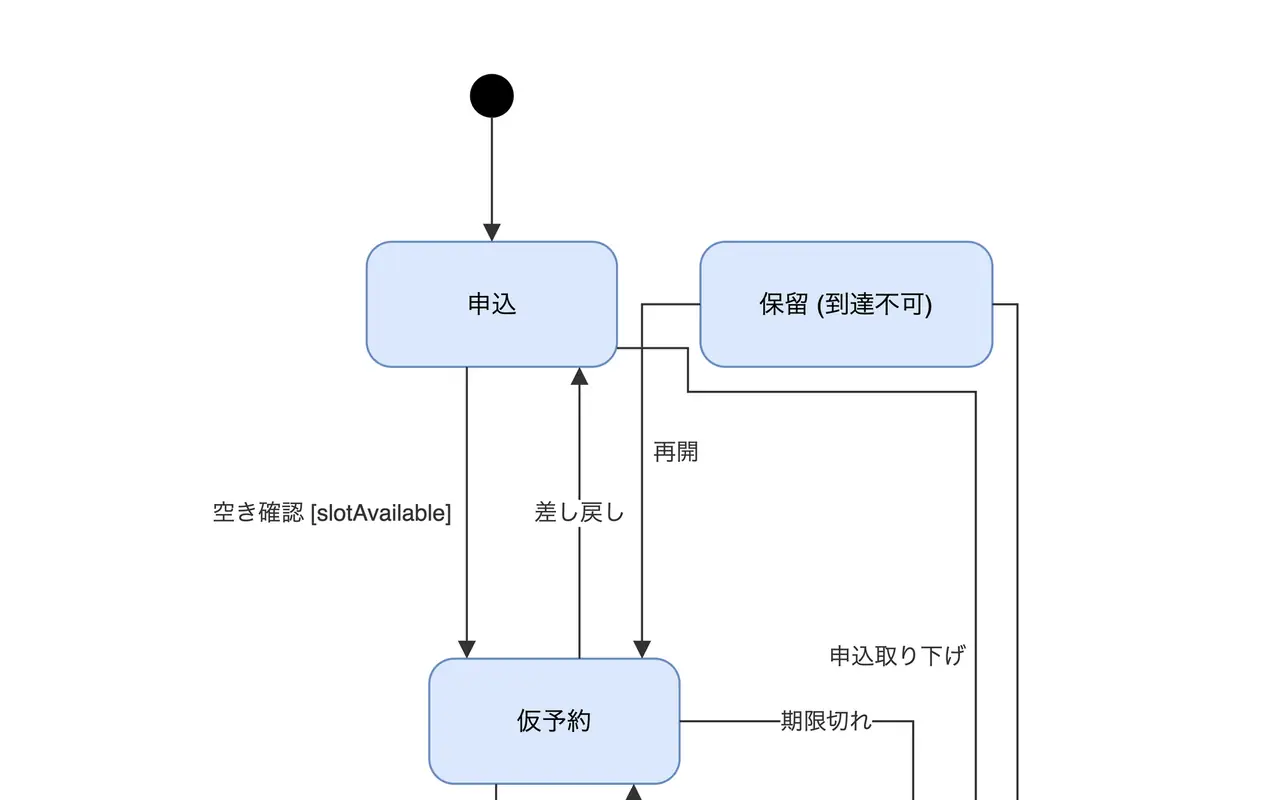
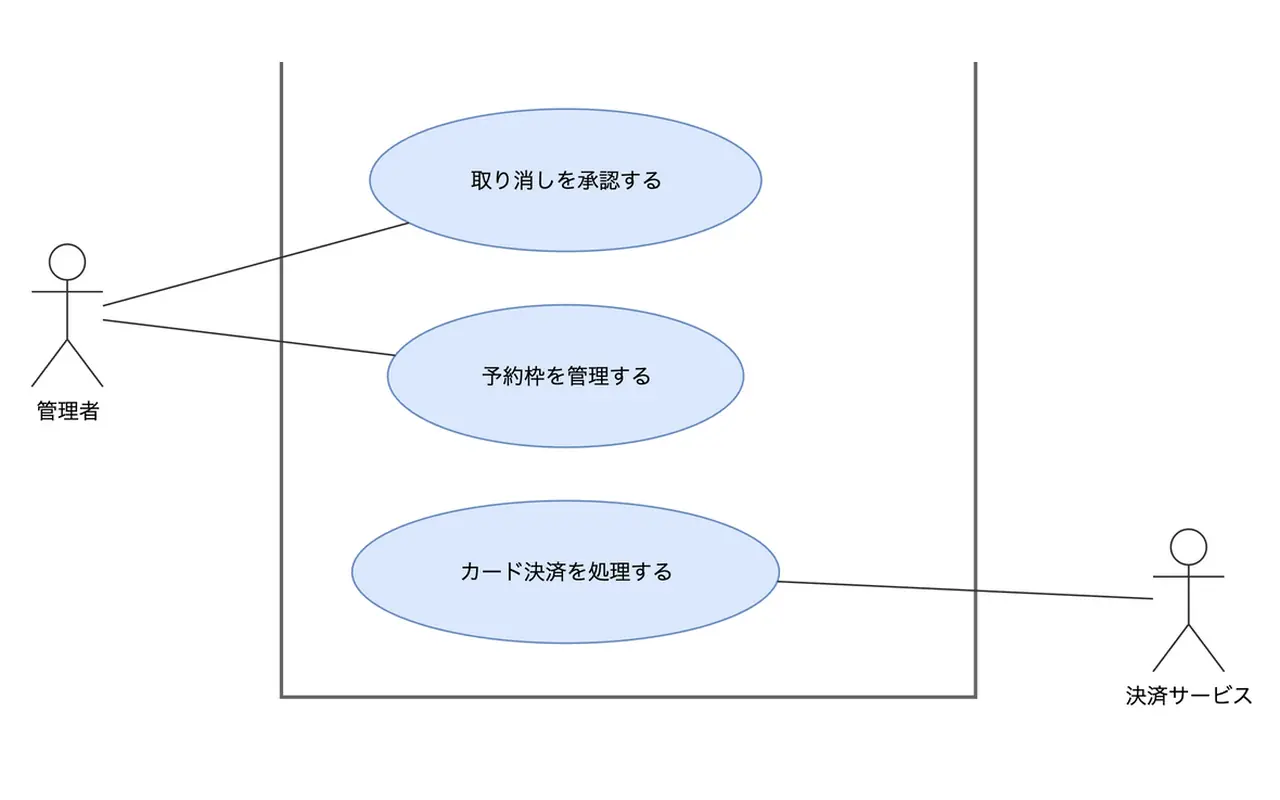
See it in action実際の出力例
Who it's forこんな方に
What it doesできること
UML Diagrams draws the diagrams a requirements and basic-design package needs, as draw.io files your client can open and edit, and writes down where every element came from.
Five diagram types, chosen from your request (the skill asks when it is unclear):
- Use case diagram (ユースケース図): actors, including outside systems such as a payment service, and the use cases inside a system boundary. Include and extend relations are drawn only when the document states them.
- Activity diagram (アクティビティ図): initial and final nodes, decisions with guards, and fork and join for steps that run in parallel.
- Flowchart (フローチャート): standard terminator, process, decision, data and document symbols, with a labelled Yes or No on every decision exit.
- Business flow diagram (業務フロー図): swimlanes by role, department or system, with each step in the lane of the one who does it and the handovers between lanes.
- State diagram (状態遷移図): every state, transitions written as event [guard] / action, and a warning for states that nothing leads into. For TypeScript or JavaScript code, a script reads the transition table so the diagram follows the code.
For each diagram you get three files in docs/design: the .drawio file, a model .json from which it can be regenerated, and an explanation document (.md) with a table of elements, their sources, what is stated and what is inferred, and questions for the system owner. Inferred elements are dashed and labelled in the diagram.
The layout is done by a script, not by guessing coordinates: it places the shapes, keeps them from overlapping and checks the file before delivery, so the result opens cleanly in draw.io. If you agree, it can also export a PNG through the draw.io desktop app and look at it before finishing. The output is draw.io only, not Mermaid or PlantUML, because that is the format most Japanese clients accept as a deliverable and can edit.
In our tests we ran each of the five diagram types three times on a sample clinic-reservation project. All 15 runs passed the layout check and every content check we set (for example every actor, a single start node, labelled Yes/No exits). A single run without the skill for each type failed our file check every time, for example with edges crossing a system boundary, labels over shapes or unlabelled nodes.
The skill reads local files only. It does not change your documents or code and does not connect anywhere. Sequence and class diagrams are not supported yet. For database diagrams use the ER Diagram skill, for screen transitions the Screen Flow Diagram skill, and to turn the result into a test specification the Test Scenarios skill. Infrastructure diagrams are covered by the AWS Infra Diagram skill.
UML Diagrams は、要件定義・基本設計で必要になる図を、お客様がそのまま開いて編集できる draw.io ファイルで作り、各要素が何を根拠にしているかも文章で残すスキルです。
依頼の内容から次の 5 種類の図を選びます(判断できないときは確認します)。
- ユースケース図: アクターと、システム境界の中のユースケース。決済サービスのような外部システムもアクターとして境界の外に置きます。包含(include)・拡張(extend)は、資料に書かれているときだけ描きます。
- アクティビティ図: 開始・終了、ガード付きの分岐、並行して進む処理を表すフォーク / ジョインを描きます。
- フローチャート: 端子・処理・判断・データ・書類の標準記号を使い、すべての判断の出口に「Yes / No」などの分岐ラベルを付けます。
- 業務フロー図: 役割・部署・システムごとのスイムレーン。各ステップは実際に作業する担当のレーンに置き、レーン間の受け渡しを矢印で示します。
- 状態遷移図: すべての状態と、「イベント [ガード] / アクション」の形の遷移。どこからも遷移してこない状態は警告します。TypeScript / JavaScript のコードなら、遷移表をスクリプトで読み取って図にします。
図ごとに docs/design に 3 つのファイルを作ります。.drawio ファイル、図を作り直すためのモデル(.json)、そして説明書(.md)です。説明書には、要素の一覧と出典、「記載あり」と「推測」の区別、システム担当者への確認事項を書きます。推測した要素は図の中で破線と「(推定)」で区別します。
配置は座標を推測せず、スクリプトで行います。図形が重ならないように配置し、納品前にファイルを検査するので、draw.io でそのまま開けます。ご希望があれば draw.io デスクトップで PNG を書き出し、仕上がりを目で確認します。出力は draw.io 形式だけです。Mermaid や PlantUML は使いません。日本のお客様に成果物として渡しやすく、後から手で直せる形式だからです。
検証では、診療所の予約を題材にしたサンプルで、5 種類の図をそれぞれ 3 回ずつ作りました。15 回すべてがレイアウト検査と、用意した内容チェック(全アクターの有無、開始が 1 つだけ、判断の出口に Yes / No のラベルがあることなど)に合格しました。スキルなしの 1 回ずつは、どの種類でもファイル検査に通らず、システム境界を横切る線、図形に重なるラベル、ラベルのない図形などが見つかりました。
読むのはローカルのファイルだけで、資料やコードを変更したり、外部に接続したりはしません。シーケンス図・クラス図には未対応です。データベースの図は ER Diagram スキル、画面遷移図は Screen Flow Diagram スキル、図からテスト仕様書を作るには Test Scenarios スキル、インフラ構成図は AWS Infra Diagram スキルをご利用ください。
How to use使い方
- Open the PMDesk app, go to Marketplace, open this skill and press Install.PMDesk アプリで「マーケットプレイス」を開き、このスキルを開いて「インストール」を押す
- Choose this project or this Mac.「このプロジェクト」か「このMac」を選ぶ
- Ask Claude Code or Codex to use the skill, then review the result in PMDesk.Claude Code または Codex にこのスキルを使うよう頼み、結果を PMDesk で確認する
Requirements必要なもの
- PMDesk (license or trial)PMDesk(ライセンスまたはトライアル)
- Claude Code or CodexClaude Code または Codex
- uv
- Node.js 20 or laterNode.js 20 以上
Scripts in this skill含まれるスクリプト
scripts/drawio_lib.pyscripts/state_from_code.mjs
The agent runs these only when it uses the skill, and asks for your permission first.エージェントはこのスキルを使うときにだけ実行し、実行前に許可を求めます。
FAQ
Which diagrams can it draw?
Use case diagrams, activity diagrams, flowcharts, business flow (swimlane) diagrams and state diagrams. It picks the type from your request and asks if it is unclear. Sequence diagrams and class diagrams are not supported yet. ER diagrams and screen flows have their own skills.
Why draw.io and not Mermaid or PlantUML?
Clients in Japan usually expect a design document they can open and rearrange themselves, and draw.io files do that in the free draw.io desktop app, in the browser and in VS Code. Mermaid and PlantUML are text formats that clients often do not accept as a deliverable, so this skill does not write them. The skill's script places the shapes and checks the file, so it does not depend on the agent guessing coordinates.
Can it work from Japanese requirement documents?
Yes. Labels use the language of your documents, so a Japanese 要件定義書 gives Japanese diagrams and an English spec gives English ones. It reads text and Markdown files in the project, and text you paste or extract from Word, Excel or PowerPoint. It does not make up steps: anything that is not in the source is drawn dashed and labelled as inferred, and listed as a question.
Can I keep editing the diagram by hand?
Yes. The .drawio file is a normal draw.io file. If the requirements change, the skill can regenerate it from the saved model, but hand edits to the .drawio are not carried into a regenerated file, so decide which of the two you edit.
Can it export a PNG?
Yes, if the draw.io desktop app is installed and you agree. The skill asks first because it starts an external program. It then opens the image to check the layout. Without the app you still get the .drawio file, which you can open in draw.io, app.diagrams.net or the VS Code extension.
Is it free, and does it work with Codex?
It is free for PMDesk users. It is a standard skill (SKILL.md plus scripts run with uv and node), so both Claude Code and Codex can use it. It reads local files only and does not change your documents or code.
どんな図が描けますか?
ユースケース図、アクティビティ図、フローチャート、業務フロー図(スイムレーン)、状態遷移図の 5 種類です。依頼の内容から図の種類を選び、判断できないときは確認します。シーケンス図・クラス図には未対応です。ER 図と画面遷移図は、それぞれ専用のスキルがあります。
Mermaid や PlantUML ではなく、なぜ draw.io なのですか?
日本のお客様には、受け取ったあとに自分で配置を直せる設計書が求められることが多く、draw.io のファイルなら無料の draw.io デスクトップ、ブラウザ、VS Code で開いて編集できます。Mermaid や PlantUML はテキスト形式で、成果物として受け取ってもらえないことがあるため、このスキルでは出力しません。図形の配置と検査はスクリプトが行うので、エージェントが座標を推測することもありません。
日本語の要件定義書から図を作れますか?
作れます。図のラベルは資料と同じ言語になり、日本語の要件定義書なら日本語の図、英語の仕様書なら英語の図になります。プロジェクト内のテキストや Markdown、Word・Excel・PowerPoint から貼り付けた(または抽出した)テキストを読みます。資料にないステップは作りません。補った部分は破線と「(推定)」で示し、確認事項として説明書に載せます。
図を手で直しながら使えますか?
使えます。.drawio は普通の draw.io ファイルです。要件が変わったときは、保存したモデルから作り直せますが、.drawio を手で直した内容は作り直したファイルには引き継がれません。どちらを直すかを決めてお使いください。
PNG に書き出せますか?
draw.io デスクトップがインストールされていて、ご承認いただければ書き出せます。外部のプログラムを起動するため、スキルは先に確認します。書き出したあと、画像を開いて配置を確認します。デスクトップがなくても .drawio ファイルは作られ、draw.io、app.diagrams.net、VS Code の拡張機能で開けます。
無料ですか? Codex でも使えますか?
PMDesk ユーザーは追加料金なしで使えます。標準的なスキル(SKILL.md と、uv / node で実行するスクリプト)なので、Claude Code でも Codex でも使えます。読むのはローカルのファイルだけで、資料やコードは変更しません。