Agent View vs Conductor vs tmux vs PMDesk: Choosing a Setup for Multiple Claude Code Agents
For most people the right first step is Claude Code's built-in Agent View: run claude agents and you get one list of background sessions across your projects, with isolated git worktrees and a "Needs input" state. Add tmux + git worktrees if you live in the terminal and want something scriptable, Conductor if you want a Mac app for parallel coding agents with isolated workspaces, and PMDesk if your work is directing agents from requests, plans and client documents rather than writing code yourself.
What are the options for running multiple Claude Code agents?
In 2026 there are five common setups. They sit at different layers, so they are not all direct competitors:
- Claude Code Agent View: built into Claude Code, opened with
claude agents. - A terminal you arrange yourself, usually iTerm2 with tabs, panes and profiles.
- tmux + git worktrees: one worktree and one tmux window per agent.
- Conductor: a Mac app that runs coding agents in parallel in isolated workspaces.
- PMDesk: a Mac app for directing agents across projects, with requests, plans, to-dos, client documents and review around a real terminal.
Claude Code Agent View: the built-in starting point
Agent View is part of Claude Code. Anthropic's docs describe it as "one screen for all your background sessions: what's running, what needs your input, and what's done." It is currently a research preview, so the interface may still change.
What it does:
- Background sessions.
claude --bg "<prompt>"starts a session that keeps running without a terminal open; a supervisor process runs it on your machine./bgsends the current conversation to the background. - One list across projects. By default the list shows every background session you started, in all your projects.
claude agents --cwd <path>narrows it to one. - Status. Rows are grouped by state, such as Needs input, Working and Completed. While Agent View is open, Claude Code notifies you when a session needs input, finishes or fails.
- Worktree isolation. A session dispatched from Agent View moves into its own git worktree under
.claude/worktrees/before editing files, so parallel sessions in one repository do not overwrite each other. - Attach and peek. Press Space to peek and reply, Enter to attach to the full conversation, and detaching never stops the session.
It costs nothing extra and needs no new app. The limits are the ones the docs list: background sessions use your subscription quota like interactive ones, they stop if the machine shuts down, and it only runs Claude Code. It manages sessions, not the written work around them: requests, plans, open questions and documents still live wherever you keep them.
iTerm2 (or any terminal) arranged by hand
Before built-in session management, most people ran each agent in its own terminal tab. iTerm2 is the most capable option on macOS for this:
- Split panes for two or three
claudesessions side by side, or a shell next to the agent. - Profiles per project with a starting directory, colors and title.
- Triggers that match terminal output, for example the text Claude Code prints when it asks for permission, and post a notification.
- Badges with the project name so panes are easy to tell apart.
- tmux integration (
tmux -CC) that shows tmux windows as native tabs.
It is free, open source and mature. It works well for one or two agents in one repository, especially if you write a lot of the code yourself. Past that, you maintain the triggers and layouts by hand, and nothing tells you which of ten panes needs you without looking. We go deeper into that problem in Why Terminal Sprawl is the Real Bottleneck in Agentic Development.
tmux + git worktrees: the scriptable setup
Many experienced developers give each agent its own git worktree (a separate checkout of the same repository on its own branch) and its own tmux window:
git worktree add ../myapp-export -b feature/export
tmux new-window -n export -c ../myapp-export 'claude'
Agents work on the same codebase without touching each other's files, tmux keeps everything alive over SSH, and the whole setup can be scripted. The cost: you create and clean up worktrees yourself, install dependencies in each, and there is no per-agent status unless you build it. Agent View now does the worktree part automatically for sessions it dispatches, so this setup matters most on remote machines and for people who want full control.
Conductor: a Mac app for parallel coding agents
Conductor describes itself as a way to "run parallel coding agents on your Mac." According to its site, it supports Claude Code, Codex and Cursor, runs each agent in an isolated workspace, shows what each agent is doing at a glance, and lets you check each agent's changes and merge them into your codebase.
It is aimed at developers who run several coding tasks on a codebase in parallel and review the resulting changes. Check its site for current platforms and pricing.
PMDesk: directing agents across projects
PMDesk sits one layer up. It is a macOS app for people who direct AI coding agents across several projects, such as project leads, forward-deployed and contract engineers, and PMs. It runs Claude Code or Codex in a real terminal, under your own subscription, and puts the project work around it:
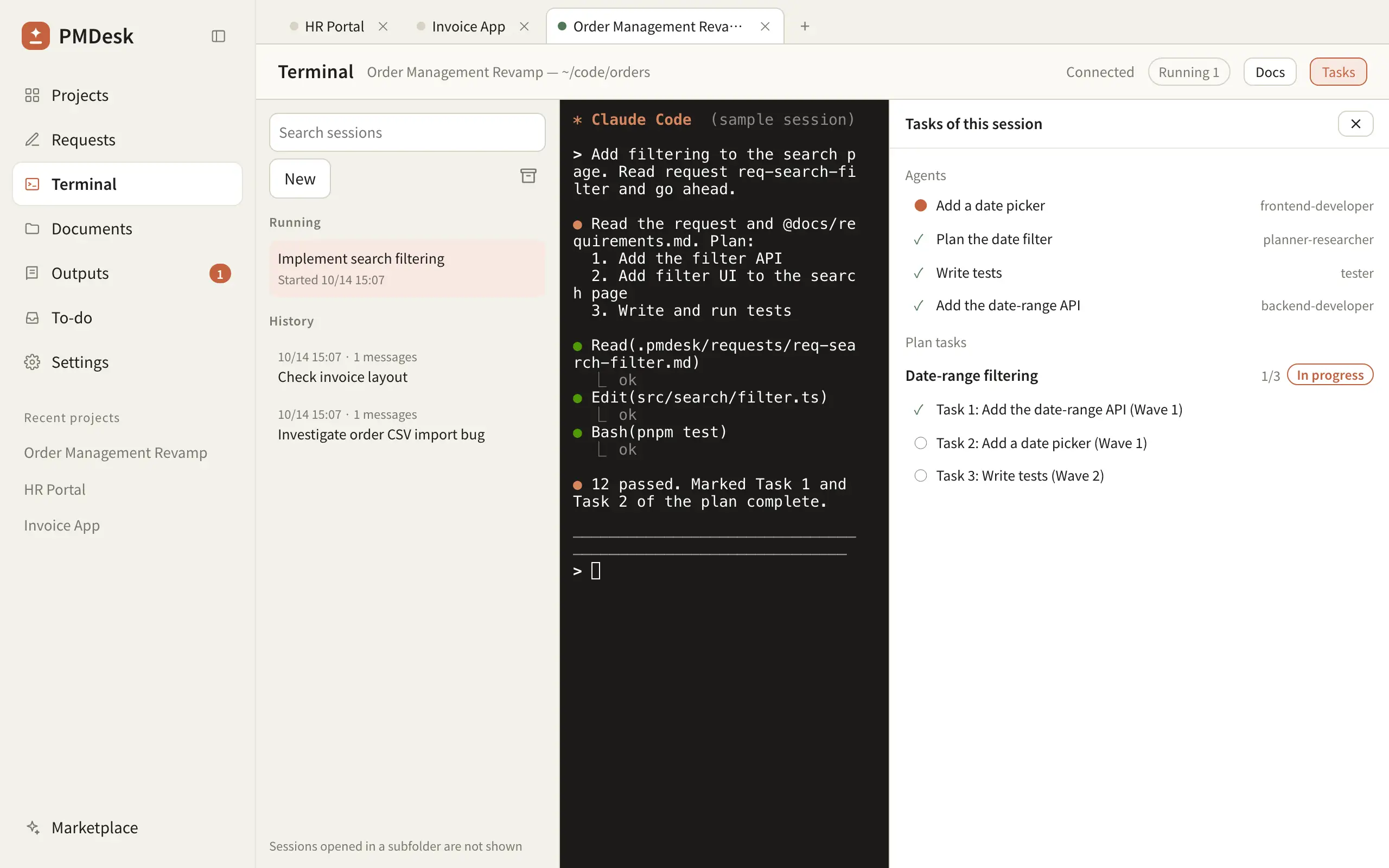
- One tab per project, sessions running in the background (5 at once by default, configurable), resume from history, rename and archive.
- A "Waiting" badge on the session, the project tab and the sidebar when an agent finishes its turn or asks for permission, with an optional macOS notification.
- Requests, change requests (CRs) and to-dos written as files in the project and handed to an agent in one click, which starts a new session for that task.
- Plans and a Tasks pane that shows the plan's tasks, ticked when a commit mentions them, and the subagents Claude Code delegated to.
- Client document folders (Box, Google Drive or any folder) read in place; PMDesk never writes to them.
@references files in requests and comments. - Review: read the Markdown and HTML an agent produces, comment on passages, and send all fixes back at once.
Project data stays in the project folder on your Mac; PMDesk has no AI model of its own. What it does not do: it is not a code editor, has no built-in diff view, does not manage git worktrees and has no team sync. It runs on macOS today; Windows is coming.
Comparison at a glance
| Agent View | iTerm2 by hand | tmux + worktrees | Conductor | PMDesk | |
|---|---|---|---|---|---|
| What it is | Built into Claude Code | Terminal emulator | Terminal multiplexer + git | Mac app for parallel coding agents | Mac app for directing agents across projects |
| Agents | Claude Code | Any CLI | Any CLI | Claude Code, Codex, Cursor (per its site) | Claude Code, Codex |
| Sessions across projects | One list of background sessions | Tabs and profiles you arrange | Windows you arrange | Per its site | One tab per project, background sessions, history |
| Knowing who needs you | Needs input state, notifications while open | Triggers you configure | None built in | Status at a glance | Waiting badge on session, tab and sidebar, optional notification |
| Parallel work in one repo | Automatic worktree per dispatched session | Manual | Manual worktrees | Isolated workspaces | Not managed; use worktrees or Agent View |
| Requests, plans, to-dos | Not included | Not included | Not included | Not its focus | Built in, handed to an agent in one click |
| Client documents and review | Not included | Not included | Not included | Reviews code changes | Registered document folders, comment on Markdown/HTML output |
| Price | Included with Claude Code | Free, open source | Free, open source | See its site | One-time license |
Which setup should you pick?
Start with Agent View if you use Claude Code and want several agents running without new tools. For many developers it is enough.
Use tmux + git worktrees if you work over SSH or on remote machines, use several CLI agents, or want everything scripted.
Stay with iTerm2 by hand if you run one or two agents and write most of the code yourself.
Look at Conductor if you want a Mac app built around running coding agents in parallel and reviewing their changes.
Try PMDesk if your day starts from requests, specs and client documents rather than your own keyboard: you direct agents across three or more projects, review a lot of written output, or need to follow agent work without living in a terminal.
These combine. Agent View and PMDesk both run the same claude in the same project folder, and many people keep iTerm2 for their own shell. For the habits that make any of these work, see How to Manage Multiple Claude Code Agents Without Losing Context. If PMDesk fits, download PMDesk for Mac.
FAQ
Does Claude Code have a built-in way to manage multiple agents?
Yes. Agent View, opened with claude agents, lists your background sessions across projects, groups them by state such as Needs input and Completed, and moves dispatched sessions into their own git worktrees. It is a research preview, and it only runs Claude Code.
What is the best Conductor alternative for Claude Code?
It depends on what you need. For running sessions in parallel, Claude Code's own Agent View is free and built in. tmux + git worktrees is the scriptable option. If you direct agents across projects from requests, plans and client documents, PMDesk covers that layer.
How do I run multiple Claude Code agents in iTerm2?
Give each project its own tab or profile, use split panes for agents in the same project, add badges, and set triggers or notifications for permission prompts. For several agents on one repository, give each its own git worktree, or dispatch them from Agent View, which does that for you.
Should each Claude Code agent have its own git worktree?
When two or more agents edit the same repository at the same time, yes. A worktree gives each agent its own checkout and branch, so builds and tests do not interfere. Agent View creates one automatically for sessions it dispatches; with tmux you create them with git worktree add.
Does PMDesk replace Agent View or my terminal?
No. PMDesk runs Claude Code or Codex in a real terminal inside each project tab. It adds the project layer around the sessions: requests, plans, to-dos, client documents and review. You can keep using Agent View and your own terminal alongside it.