Claude Code Desktop's October Update: Nested Sessions, Saved Environments, Idle Compaction, and Where PMDesk Fits
Claude Code's October 2026 update makes the desktop app much better at running several sessions at once: parallel tasks now run as nested sessions under the session that started them, you can save a group of folders, an SSH host or the cloud as a reusable environment, and the sidebar shows which sessions are working and which need you. Under the hood, version 2.1.299 added idle compaction, so a 200K+ token conversation you leave for an hour is compacted before its one-hour prompt cache expires. PMDesk runs the same Claude Code CLI, so it gets the engine-side changes automatically; what it adds is the project layer the desktop app does not try to cover: requests, plans, to-dos and client documents next to the sessions.
What changed in the Claude Code desktop app?
Anthropic announced the update on October 14, 2026 in a thread from @ClaudeDevs, describing the goal as making the desktop app "great for running lots of sessions side by side." Update the desktop app and start a new session to get it.
Nested sessions for parallel work
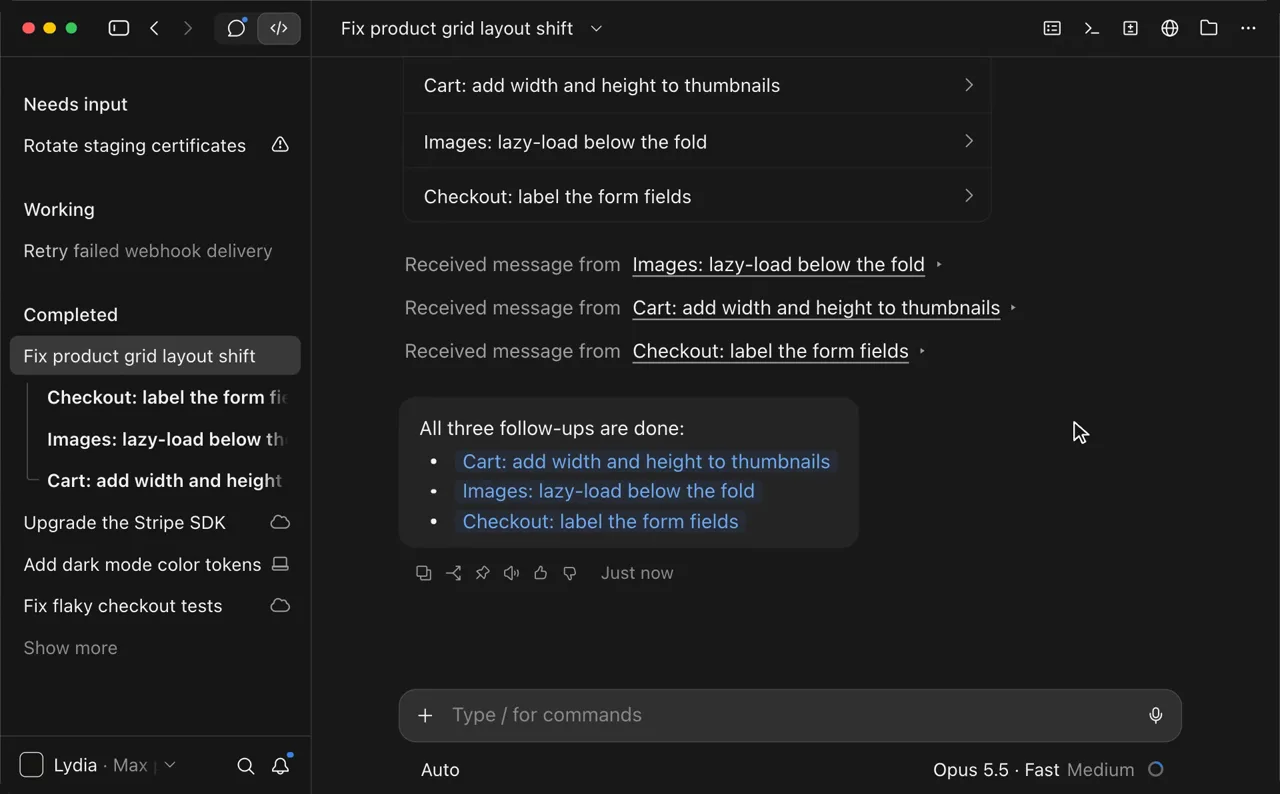
When you ask Claude to run tasks in parallel, it starts a nested session for each one. In the sidebar they sit directly under the parent session, and each one sends its result back into the main conversation when it is done, so the main thread stays readable. Claude also suggests follow-up work while it runs, which you can start as its own session in one click, and /btw opens a side question in its own tab while the main session keeps going.
Saved environments: several folders, SSH or the cloud
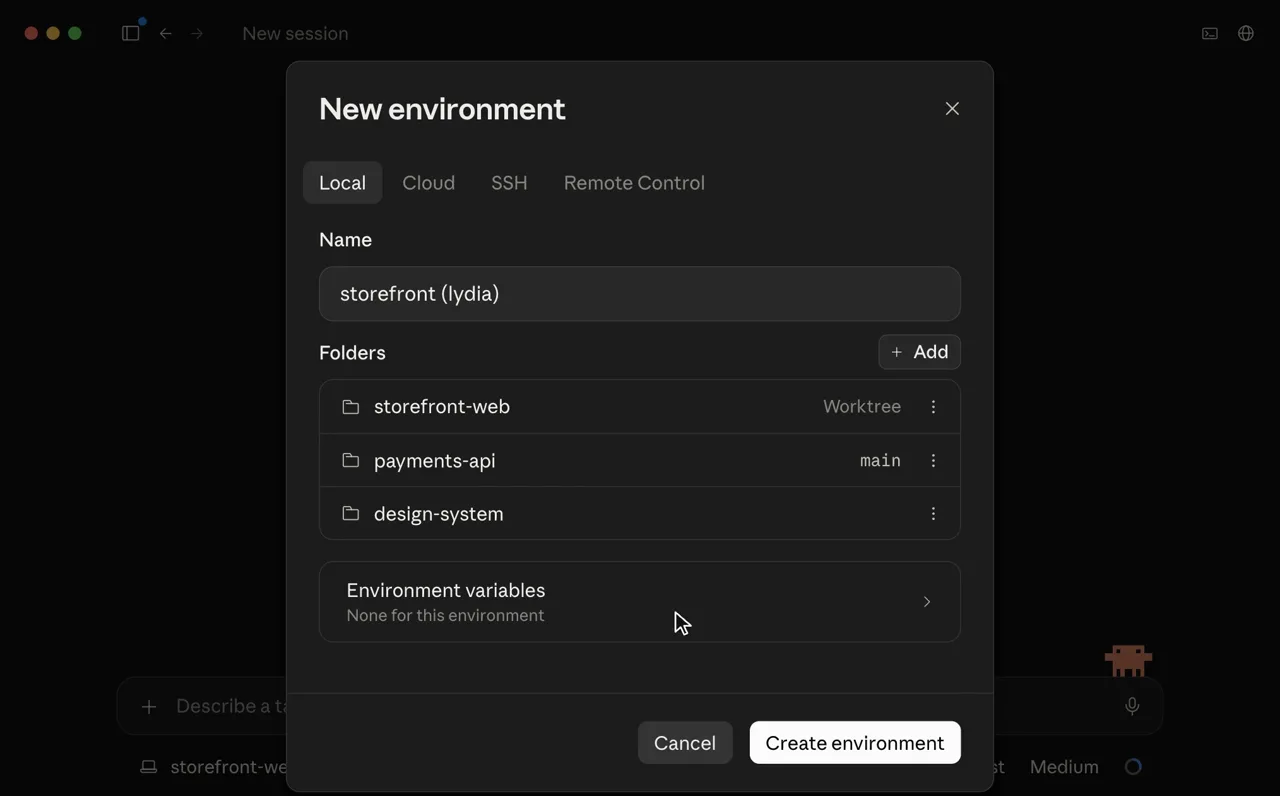
The new session screen keeps your recent folders one click away. You can also save a setup as an environment (a few folders, an SSH host or the cloud) and start sessions there, with the option of a git worktree per folder. If a task spans a frontend repo, an API repo and a design system, you set that up once instead of every time.
A sidebar and side rail that show what each session is doing
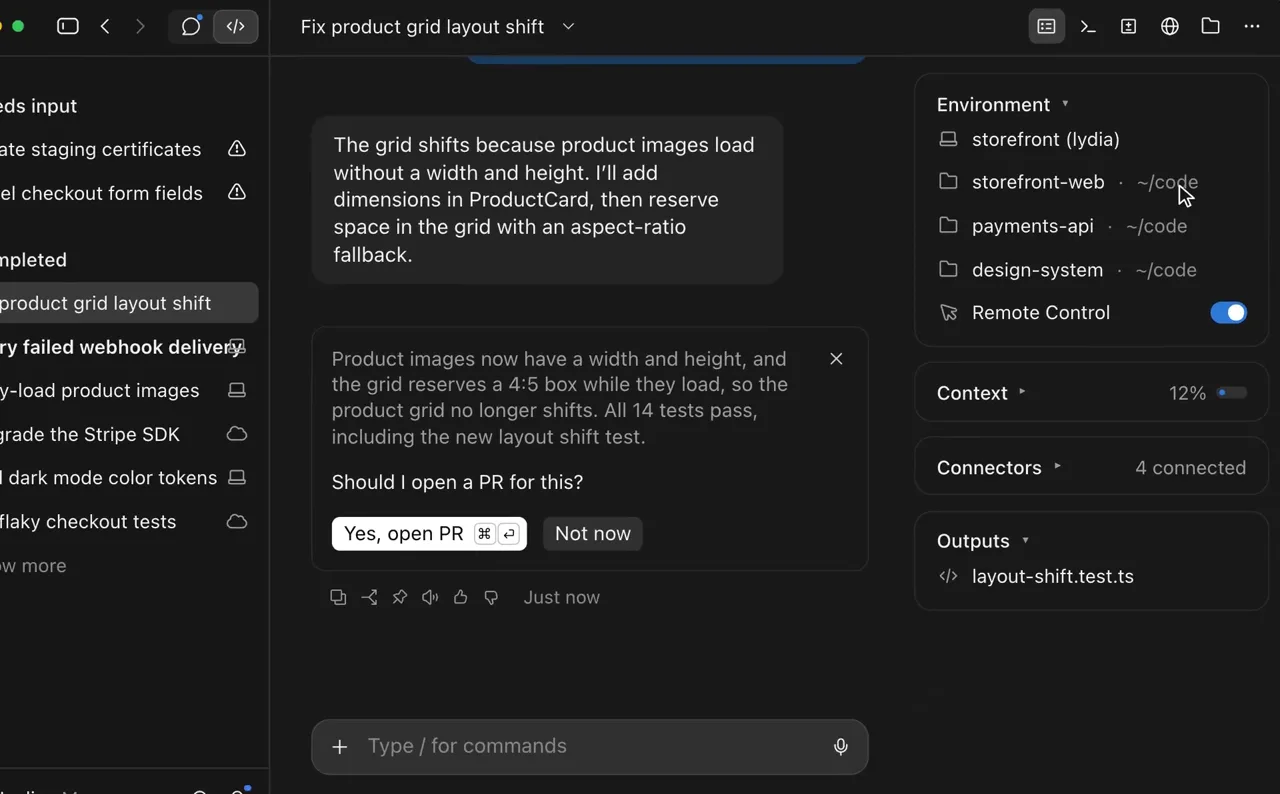
The sidebar groups sessions into Needs input, Working and Completed. Inside a session, a live to-do list follows Claude's plan as it goes, a recap card sums up the turn when Claude needs you, and the side rail shows where the session runs, its context usage and its changes.
Idle compaction makes the one-hour cache pay off
This change is in the CLI rather than the app, runs in the background, and saves the most usage. Two rules combine:
- One-hour prompt cache. On a Claude subscription, within your plan's included usage, Claude Code asks for a one-hour prompt cache for the main conversation. With an API key, a cloud provider or on usage credits past your plan's limit, it uses the five-minute cache.
- Idle compaction (2.1.299, October 14). In the changelog's words: "a 200K+ token conversation left idle for about 54 minutes is compacted before its one-hour prompt cache expires, so your next message doesn't reprocess it all."
In practice: you leave a long session for a meeting, come back an hour later, and your next message does not pay to resend 200K tokens of history. Change the threshold with CLAUDE_CODE_IDLE_COMPACT_MIN_TOKENS, or turn it off with "idleCompaction": false in settings if you prefer to keep the full conversation.
Other October releases help with subagents too: you can send a message to a running subagent (2.1.293), subagents can set their own autoCompactWindow (2.1.296), and subagents you had messaged no longer vanish from /tasks when they finish (2.1.300).
What got too simple?
The direction is right, but in daily use a few things now take an extra click.
The subagent pane. Each subagent shows a title and a stop button. To see how far one has got or how much it has used, you click into it. With four subagents running, "which one is stuck?" means checking each.
Context next to the input. The usage ring is still next to the model picker, but the detailed context figure now lives in the side rail. If you work with the rail closed, you no longer see at a glance how full the session is, which matters more now that a session past 200K tokens will be compacted when you leave it.
If you want the detail in text, the CLI still has it: /context breaks down what fills the context window, and /tasks lists the background work in the session.
How does this compare to PMDesk?
PMDesk is a macOS app for people who direct AI coding agents across several projects. It runs Claude Code (or Codex) in a real terminal in each project tab, under your own subscription. The October update moves the desktop app closer to some of what PMDesk does, while the two still sit at different layers.
| Claude Code desktop (October 2026) | PMDesk | |
|---|---|---|
| Parallel work | Nested sessions under the parent, results reported back | Subagents of the current session in the Tasks pane; several sessions per project |
| Session status | Needs input / Working / Completed in the sidebar | Waiting badge on the session, project tab and sidebar, optional macOS notification |
| Subagent detail | Title and stop button; click for output | Description, agent type and state (running or done) in the Tasks pane |
| Plan progress | Live to-do list that follows Claude's plan in the session | Plan files in the project; tasks ticked when a commit mentions them |
| Where sessions run | Saved environments: several folders, SSH, cloud; worktree per folder | Local, one folder per project tab; no worktree management |
| Context usage | Usage ring and side rail | The CLI's own status line and /context in the terminal |
| Idle compaction, one-hour cache | Yes | Yes, because PMDesk runs the same claude CLI |
| Requests, to-dos, client documents | Not included | Requests and change requests handed to an agent in one click, to-dos, registered document folders |
| Review of written output | Diffs and outputs | Comment on Markdown/HTML documents and send all fixes back at once |
| Agents | Claude Code | Claude Code and Codex |
| Price | Included with Claude Code | One-time license |
Where Claude Code desktop is ahead
Saved environments are the clear win. PMDesk opens one local folder per project; it does not run sessions over SSH or in the cloud, has no multi-folder environments and does not create worktrees. Nested sessions that report back into the main thread are also cleaner than reading several terminals. If your tasks span repositories or machines, the desktop app handles it natively.
Where PMDesk adds something
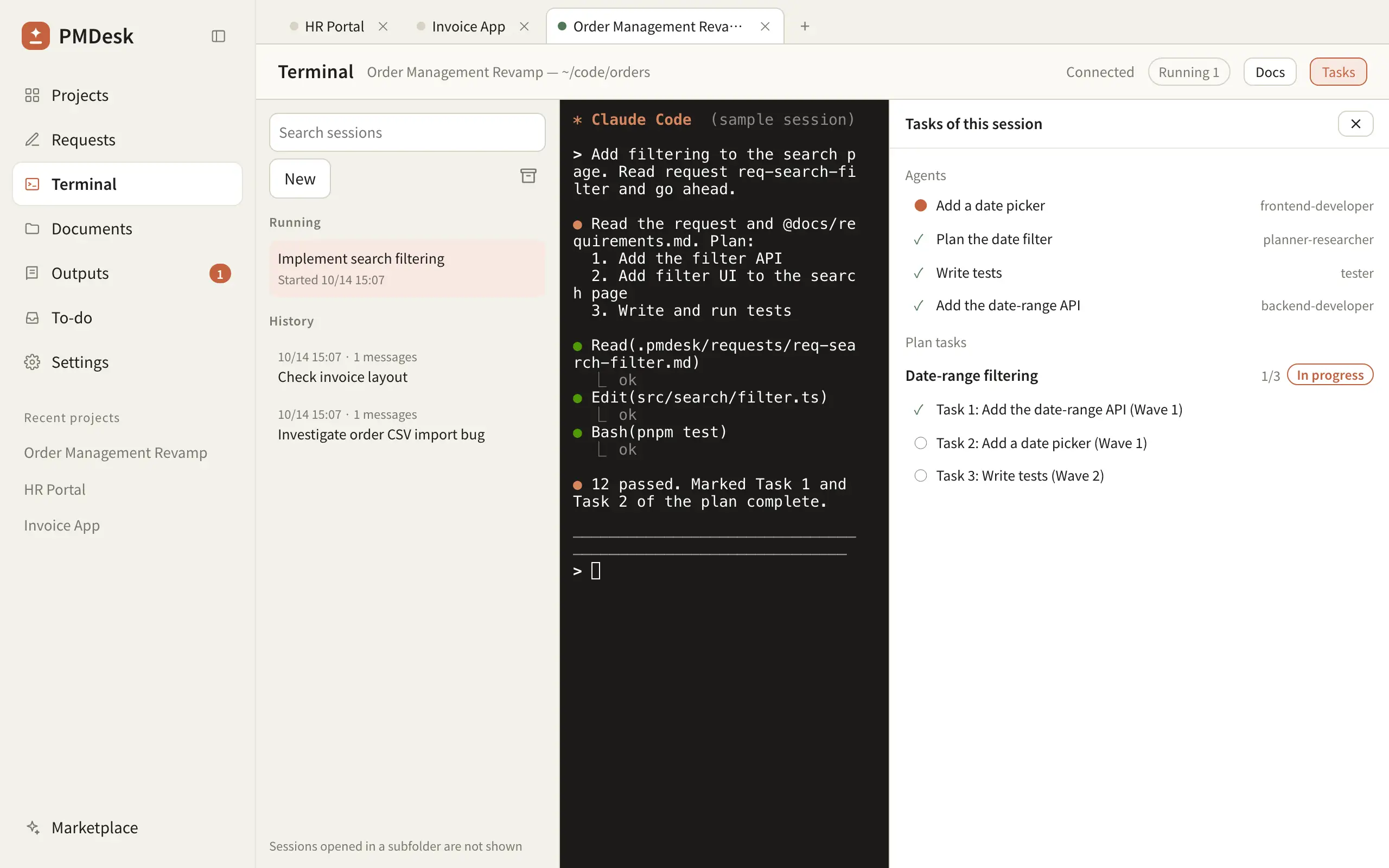
PMDesk's Tasks pane keeps the detail the desktop subagent pane trimmed: which subagent is still running, which are done and which agent type took each one, with the plan's tasks underneath, ticked from commits. Because the plan is a file in the project, progress survives a closed session or a switch to Codex.
The bigger difference is what surrounds the sessions. The desktop app organises sessions; PMDesk keeps the written work for each task beside them: the request that started it, the plan, open to-dos, the client's documents and your review comments on what the agent produced. That is the part people who direct work across several client projects spend most of their day in.
They work together
PMDesk runs the real claude CLI, so idle compaction, the prompt cache rules and the subagent fixes apply to sessions you run in PMDesk without any change, and sessions share history: one started in PMDesk can be resumed with claude --resume in any terminal. A reasonable split is the desktop app for multi-repo, SSH and cloud work, and PMDesk for the client projects you direct day to day.
Which should you use?
Use Claude Code desktop if you mostly work in one or two codebases, want nested parallel sessions, or need SSH, cloud or multi-folder environments.
Add PMDesk if you direct agents across three or more projects, start work from requests and client documents, also use Codex, or want subagent and plan progress visible without clicking into each one. For the habits behind either setup, see How to Manage Multiple Claude Code Agents Without Losing Context; for a wider comparison, Agent View vs Conductor vs tmux vs PMDesk. If PMDesk fits, download PMDesk for Mac.
FAQ
What are nested sessions in Claude Code desktop?
When you ask Claude to run tasks in parallel, the desktop app starts a nested session for each one. They appear under the parent session in the sidebar and report their results back into the main conversation when they finish.
What is a saved environment in Claude Code desktop?
A reusable setup you start sessions in: a few local folders, an SSH host or the cloud, with the option of a git worktree per folder. You create one from the new session screen and pick it the next time you start a session.
What is idle compaction in Claude Code?
Since version 2.1.299, when a conversation of 200K tokens or more sits idle for about 54 minutes, Claude Code compacts it before its one-hour prompt cache expires, so your next message does not reprocess the full history. Change the threshold with CLAUDE_CODE_IDLE_COMPACT_MIN_TOKENS or turn it off with "idleCompaction": false.
Does Claude Code use a one-hour prompt cache?
On a Claude subscription, within your plan's included usage, Claude Code requests a one-hour cache for the main conversation. With an API key, a cloud provider, or on usage credits after you pass your plan's limit, the main conversation uses the five-minute cache.
How do I see context usage for a Claude Code session?
In the desktop app, open the side rail or click the usage ring next to the model picker. In the CLI, run /context for a breakdown. PMDesk runs the CLI, so /context works there too.
Does PMDesk get Claude Code's new features?
The CLI ones, yes: idle compaction, the prompt cache rules and subagent fixes apply automatically because PMDesk runs the same claude command. Desktop-only interface features, such as nested sessions in the sidebar and saved environments, stay in the desktop app.