tmux vs PMDesk: Running Claude Code Agents Across Several Projects
tmux is the best tool for keeping terminal sessions alive, over SSH or after you close the laptop lid, and it is free and scriptable. It does not know what is running inside each pane, so with five or more Claude Code or Codex agents you end up checking panes one by one to find the one that needs you. PMDesk runs the same agents in a real terminal per project and adds the layer tmux does not have: a Waiting badge, requests, plans, to-dos and review. Many people use both.
What does tmux give you for AI agents?
tmux is a terminal multiplexer. One session holds many windows and panes, and everything keeps running when you detach. For agents that is a real advantage:
- Persistence. Start
claudein a window, detach, close the terminal, come back tomorrow, andtmux attachshows the same session. - Remote work. On an SSH host or a cloud machine, tmux is often the only reason a long agent run survives a dropped connection.
- Scripting.
tmux send-keys, named sessions and layouts let you start a whole setup with one script, and tools such as tmux-based orchestrators build on this. - Any CLI. It does not care whether the program is Claude Code, Codex or a shell.
- Free and everywhere. It is open source and installed on most servers.
Where does tmux get hard with several agents?
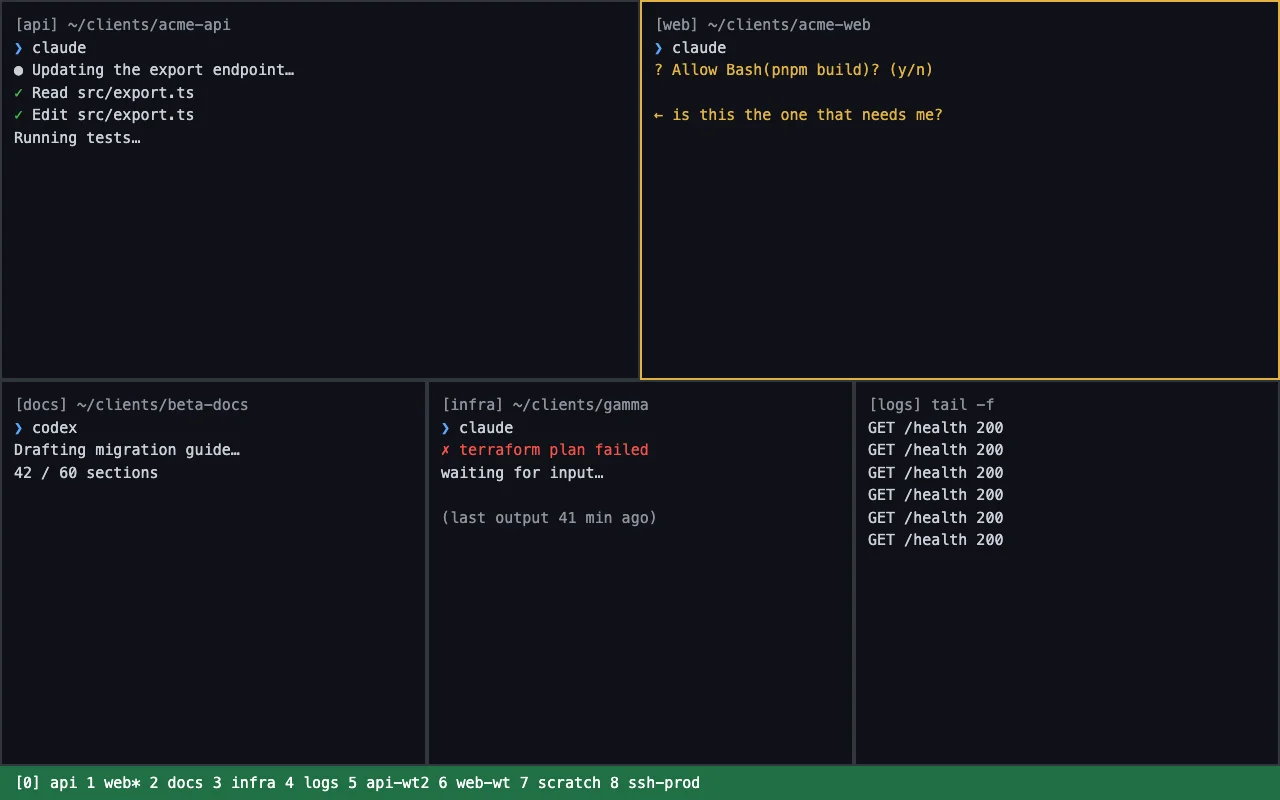
tmux treats every pane as a stream of text. It has no idea that one pane is an agent waiting for "Allow Bash(pnpm build)?" and another is mid-edit. In daily use:
- No "who needs me". You cycle through windows, or write monitor scripts and notification hooks yourself, and maintain them.
- Layouts are manual. Window 4 is infra today and logs tomorrow. Names and order drift, and after a restart you rebuild them.
- Parallel work in one repo needs worktrees. You run
git worktree addand clean up yourself. - The written work lives elsewhere. Requests, plans, open questions and client documents sit in other apps, so you copy between them and the agent.
- Reviewing output is a scroll. A long Markdown report that an agent wrote is read in a pane, with no way to comment on a passage and send fixes back.
None of this is a flaw in tmux; it was not built for it.
What does PMDesk add?
PMDesk is a macOS app for people who direct AI coding agents across several projects. It runs Claude Code or Codex in a real terminal in each project tab, under your own subscription, and puts the project work around the terminal:
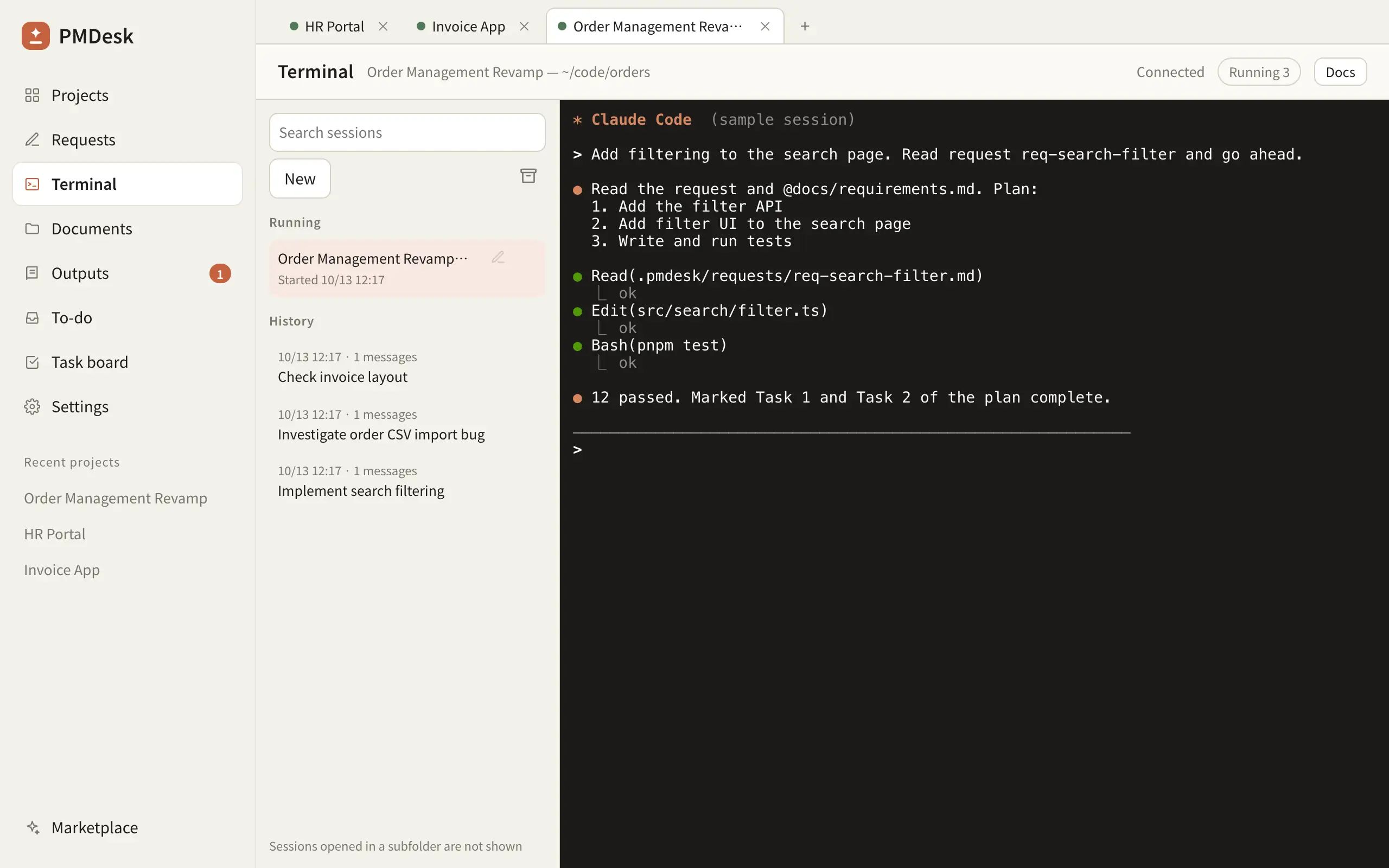
- One tab per project, with background sessions (5 at once by default), history to resume from, rename and archive.
- A Waiting badge on the session, the project tab and the sidebar when an agent finishes its turn or asks for permission, with an optional macOS notification. This is the part you would otherwise script in tmux.
- Requests, change requests and to-dos stored as files in the project and handed to an agent in one click, which starts a new session for that task.
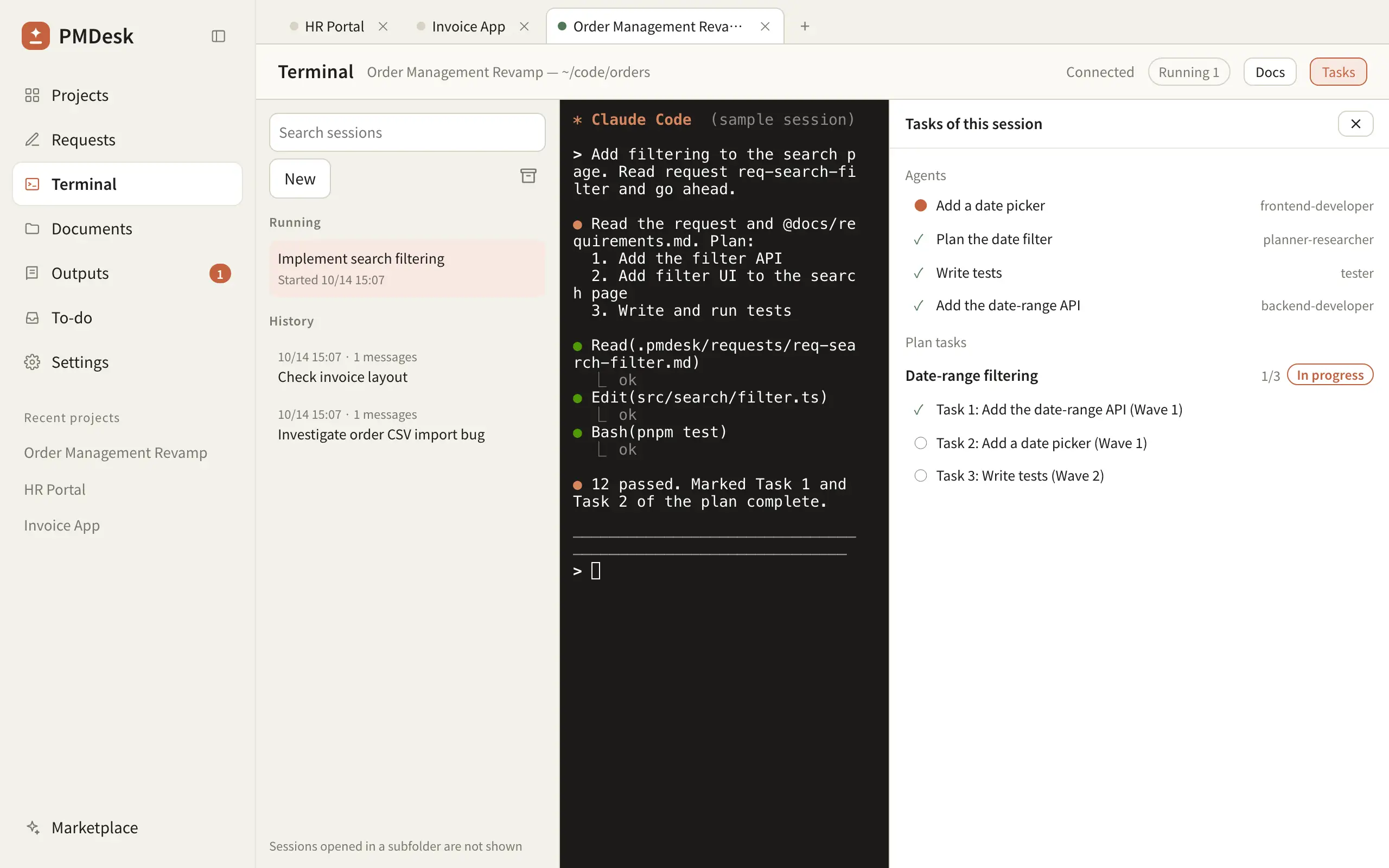
- Plans and a Tasks pane that lists the plan's tasks, ticked when a commit mentions them, and the subagents Claude Code delegated to.
- Client document folders (Box, Google Drive or any folder) read in place, never written to.
- Review: read the Markdown and HTML an agent produces, comment on passages and send all fixes back at once.
What PMDesk does not do: it runs on macOS only today (Windows is coming), it opens local folders rather than SSH hosts, it does not manage git worktrees, and it is not a code editor.
tmux vs PMDesk at a glance
| tmux | PMDesk | |
|---|---|---|
| What it is | Terminal multiplexer | Mac app for directing agents across projects |
| Agents | Any CLI | Claude Code, Codex |
| Sessions survive closing the terminal | Yes | Yes, background sessions keep running while the app is open |
| Works over SSH / remote hosts | Yes, its strongest case | No, local folders only |
| Knowing which agent needs you | Scripts and hooks you write | Waiting badge on session, tab and sidebar, optional notification |
| Organising by project | Sessions and windows you name | One tab per project, history and archive |
| Parallel work in one repo | Manual git worktrees | Not managed; use worktrees yourself |
| Requests, plans, to-dos | Not included | Built in, handed to an agent in one click |
| Client documents and review | Not included | Registered folders; comment on Markdown/HTML output |
| Platform | macOS, Linux, servers | macOS (Windows coming) |
| Price | Free, open source | One-time license |
Which should you use?
Use tmux if you work mostly over SSH or on remote machines, run one to three agents, enjoy scripting your setup, or need Linux.
Use PMDesk if you direct agents across three or more projects, start from requests and client documents, review a lot of written output, or are tired of hunting for the pane that is waiting on you.
Use both. PMDesk runs the same claude command in the same project folder, so a session started in PMDesk can be resumed with claude --resume anywhere, including inside tmux on a server. A practical split is PMDesk for day-to-day project work on your Mac and tmux for remote machines.
For the habits behind either setup, see How to Manage Multiple Claude Code Agents Without Losing Context, and for a wider comparison, Agent View vs Conductor vs tmux vs PMDesk. If PMDesk fits, download PMDesk for Mac.
FAQ
Can I run Claude Code in tmux?
Yes. Start claude in a tmux window and it keeps running when you detach. This is common on remote machines and for long tasks. You get persistence, but no built-in indication of which window needs your input.
How do I know which tmux pane needs my input?
tmux does not know. You can watch panes for activity or silence with its monitor options, or write hooks and scripts that look for the permission prompt text. PMDesk shows a Waiting badge on the session, project tab and sidebar instead.
Does PMDesk replace tmux?
No. PMDesk runs agents in a real terminal per project on your Mac and adds requests, plans, to-dos and review. It does not work over SSH, so tmux remains the better choice for remote sessions.
Can I use tmux and PMDesk together?
Yes. Both run the same Claude Code CLI, and sessions share history, so one started in PMDesk can be resumed with claude --resume in a tmux window.
Do I still need git worktrees with either setup?
When two or more agents edit the same repository at once, yes. With tmux you create worktrees yourself; PMDesk does not manage them either, so create them or use Claude Code's Agent View.