How to Manage Multiple Claude Code Agents Without Losing Context
To manage multiple Claude Code agents without losing context, keep the context in files instead of in your head or in scrollback: one task per session, the task written down in a plan or request the agent reads, and project rules in CLAUDE.md. Name each session after its project and task, resume it with claude --resume or claude --continue instead of starting over, and use git worktrees when two sessions work in the same repository. Claude Code's built-in Agent View (claude agents) then shows every background session in one list and which ones need you; what it does not keep is the written work around the sessions: requests, plans, open questions and documents.
Why do parallel Claude Code sessions lose context?
Running one Claude Code session is easy. Running five across three projects is where things break, and they rarely break inside the agent. They break in the person directing it.
The usual failure looks like this. You start a session in project A to fix an import bug, switch to project B to answer a question from another session, and come back twenty minutes later to a terminal tab that says zsh like the other nine. You scroll up to work out what you asked for. The agent has been waiting for permission to run a command for fifteen of those twenty minutes. Meanwhile a session in project C ran out of things to do and you never noticed.
None of that is a model problem. The context existed, but in places that do not survive a tab switch: your prompt, scrollback, your memory. We wrote about the terminal side of this in Terminal sprawl in agentic development. This post is about the habits that fix most of it, and what a tool adds on top.
How should you split work across parallel Claude Code sessions?
One task per session
A session that fixes a bug, then adds a feature, then answers a question about deployment carries all three in its context. The agent gets slower and less precise, and you can no longer tell what the session is "for". Give each session one task with a clear end. When the task is done, end the session or start a fresh one for the next task. Inside a session, /clear resets the conversation if you want to reuse the terminal.
A good rule: if you could not describe the session in a short phrase like "auth: fix token refresh", it is doing too much.
Name sessions after the project and the task
When you have several terminals open, the tab title is the only label you see. Set it to something like billing / invoice export rather than leaving the shell default. It takes five seconds and is the cheapest context you will ever save.
Keep each project in its own directory and window
Claude Code works from the directory you start it in. Its history, its CLAUDE.md and its permissions are tied to that directory. Mixing projects in one terminal window makes it easy to type into the wrong one. One window (or one group of tabs) per project keeps the boundary visible.
Where should the context live so an agent can pick it up again?
The core idea: anything you would need to re-explain after a break should be in a file the agent reads, not in a chat message.
CLAUDE.md for rules that never change
CLAUDE.md at the root of the repository is loaded automatically when a session starts. Put the things every session must know there: how to run the tests, the coding style, what not to touch, how commits are written. If you find yourself pasting the same instruction into new sessions, it belongs in CLAUDE.md.
Plans and requests for the task itself
For anything bigger than a quick fix, write the task down before you hand it over: a request that says what you want and why, then a plan with numbered tasks. Store them in the repository, for example in a plans/ folder, and tell the agent to read the file. Now the task survives a closed terminal, a new session or a different agent. When you come back, you read the plan instead of scrolling through history.
Plans also make progress checkable. If each commit mentions the task it implements ("Task 3: add export endpoint"), git log tells you how far the work got without asking the agent.
Git for the state of the code
Ask agents to commit at sensible points. A commit message is context that outlives every session, and a clean working tree makes it safe to resume or switch tasks.
How do you resume a Claude Code session instead of starting over?
Claude Code keeps the history of each conversation per project directory, so you rarely need to start from zero.
claude --continue(orclaude -c) reopens the most recent conversation in the current directory.claude --resume(orclaude -r) shows a list of past conversations for the directory so you can pick one. You can also pass a session ID.- Inside a running session, the
/resumecommand lets you switch to an earlier conversation.
Resuming brings back the conversation, not your intent. That is why the plan file matters: resume the session, then point the agent at the plan and ask where it stopped. Between the two, the agent and you are back in sync in one message.
Long sessions also fill the context window. /compact summarises the conversation so far so you can keep going, but for a new task a fresh session that reads the plan is usually cleaner than a compacted old one.
Does Claude Code have a built-in way to manage multiple agents?
Yes. Agent View, currently a research preview, is Claude Code's own screen for background sessions. Run claude agents to open it, or start a session straight in the background with claude --bg "<prompt>".
- One list across projects. By default it shows every background session you started, in all your projects;
claude agents --cwd <path>narrows it to one. - Status. Sessions are grouped by state, such as Needs input, Working and Completed, and while Agent View is open Claude Code notifies you when a session needs input, finishes or fails.
- Isolation. A session dispatched from Agent View moves into its own git worktree under
.claude/worktrees/before it edits files. - No terminal needed. Background sessions keep running without a terminal open. Press Space to peek and reply, Enter to attach, and detaching never stops the session.
Two limits from the docs are worth knowing: background sessions use your subscription quota like interactive ones, so ten agents use it roughly ten times as fast, and they stop if the machine shuts down. Agent View is the natural first step before adding any other tool. The habits in this post still apply on top of it, because it tracks sessions, not the context you hand them.
How do you run parallel sessions in the same repository?
Two agents editing the same working tree will step on each other: one runs the tests while the other is halfway through a change, or both edit the same file. Git worktrees solve this by giving each session its own checkout of the same repository on its own branch.
git worktree add ../myapp-export -b feature/export
git worktree add ../myapp-auth -b fix/token-refresh
Start one Claude Code session in each folder. If you dispatch sessions from Agent View, it creates the worktrees for you. They share the git history but not the working files, so each agent can build and test without interference. When a branch is done, merge it and remove the worktree with git worktree remove ../myapp-export.
Each worktree needs its own dependencies installed, and anything shared outside the repository, such as a local test database, can still collide. Give each worktree its own database or port if the tests write data.
A checklist: where does the context live?
Before you leave a session to work on something else, check that each kind of context has a home outside your head:
| Context | Where it should live |
|---|---|
| Project rules and conventions | CLAUDE.md in the repository |
| What the task is and why | A request or plan file in the repository |
| How far the task got | Commits that mention the task, plus the plan |
| The conversation itself | Claude Code's session history (--resume, --continue) |
| Which session is which | Tab or session names: project and task |
| Which session needs you | Agent View's Needs input state, or a session manager |
| Parallel work in one repo | One git worktree and branch per session |
| Open questions for later | A to-do file, not a message you meant to answer |
If a row is empty, that is the context you will lose on the next switch.
What is still missing once sessions are managed?
Agent View answers "which session needs me?". It does not answer "what did I ask for, where is the client's spec, and how far did the plan get?". Those answers live in the rows of the table above, spread over files, folders and git log in each repository. That gap grows when you direct several projects at once, when the work starts from a client's documents, or when someone who does not live in a terminal (a PM, a reviewer) needs to follow it.
A tool that sits above the sessions can close it by keeping the written context (requests, plans, to-dos, documents and review) next to the sessions, so the "where does context live" table is one window instead of seven places. We compare Agent View, tmux, Conductor and PMDesk in Choosing a setup for multiple Claude Code agents.
How does PMDesk manage multiple Claude Code agents?
PMDesk is a macOS desktop app for people who direct AI coding agents across several projects. It works with Claude Code and Codex, which you install and sign in to yourself, and it maps directly onto the habits in this post.
- One tab per project. Each project gets a tab with Claude Code or Codex running in a real terminal. Sessions keep running in the background when you switch projects, 5 at a time by default (configurable).
- Resume, rename, archive. Past sessions are listed per project. You can resume one from history, give it a name that says what it is for, and archive it when the task is done.
- A "Waiting" badge. When an agent finishes its turn or asks for permission, the session, its project tab and the sidebar show a Waiting badge, with an optional macOS notification. You stop polling tabs.
- Requests and plans as files. Write a request or a change request and hand it to an agent in one click; it starts a new session for that task, which is the one-task-per-session rule built in. Plans live in the project, and the Tasks pane shows the plan's tasks, ticked when a commit mentions them, plus the subagents Claude Code delegated to.
- To-dos. When something should wait, the agent or you can add a to-do, and you can open the session that wrote it later.
- Client documents and review. Register a client's document folder (Box, Google Drive or any folder) and let the agent read it in place; PMDesk never writes there. Read the Markdown and HTML the agent produces, comment on passages, and send all fixes back at once.
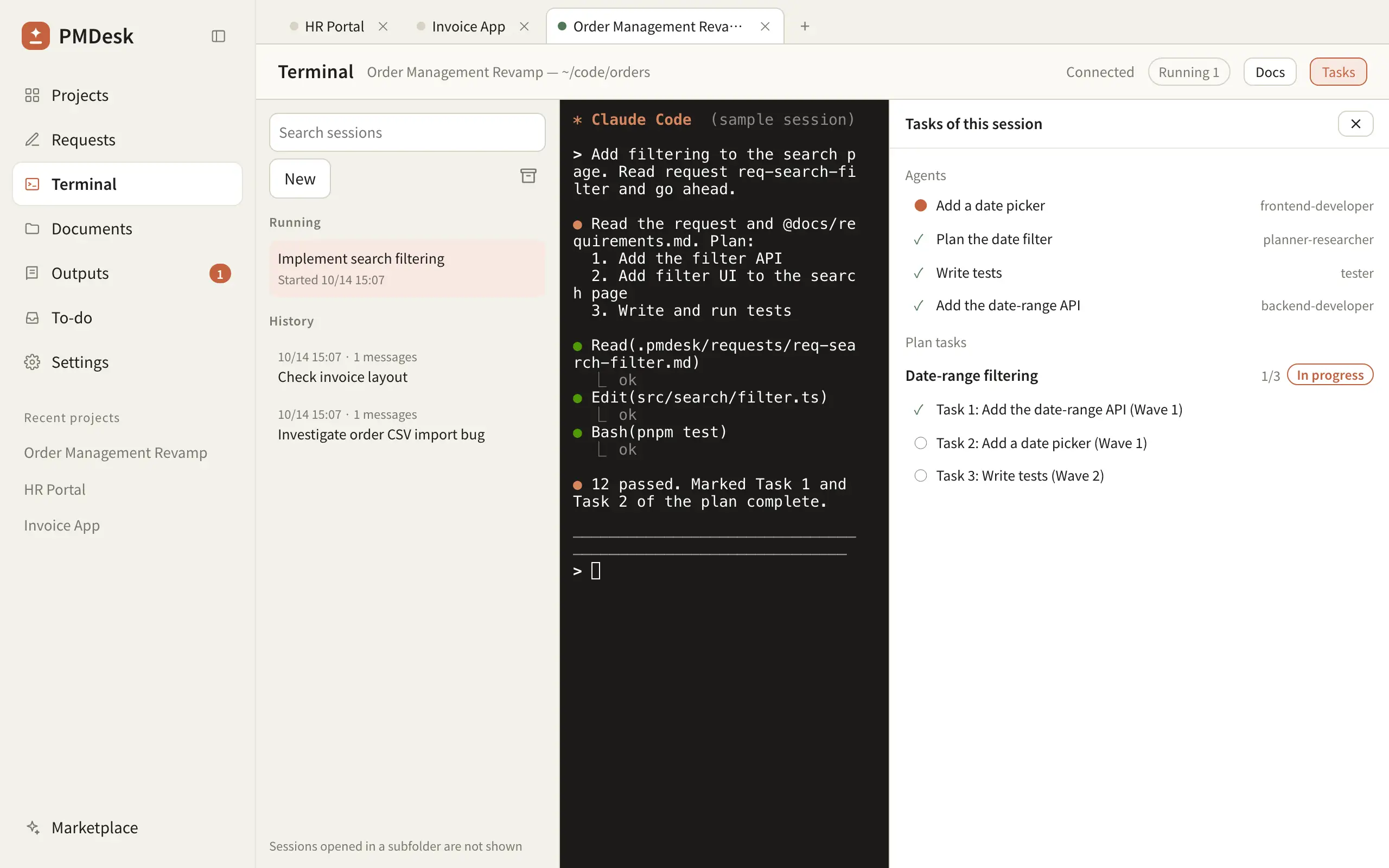
All of this stays in the project folder on your machine. PMDesk includes no AI model; the agent runs under your own Claude Code or Codex subscription. PMDesk does not manage git worktrees for you, so the worktree setup above (or Agent View) still applies when two sessions share a repository.
If you direct agents across several projects every day, download PMDesk for Mac and try it on your current projects.
FAQ
Can I run multiple Claude Code sessions at once?
Yes. Each terminal running claude is an independent session, and claude --bg starts sessions in the background that Agent View (claude agents) lists in one place. You can run as many as your machine and your plan's usage limits allow. Keep each one to a single task, and use separate git worktrees if two sessions work in the same repository.
What is Claude Code Agent View?
A built-in screen, opened with claude agents, that lists your background Claude Code sessions across projects and groups them by state such as Needs input, Working and Completed. Sessions it dispatches get their own git worktree. It is a research preview.
How do I resume a Claude Code session?
Run claude --continue (or claude -c) in the project directory to reopen the most recent conversation, or claude --resume (or claude -r) to pick one from a list. Inside a running session, /resume does the same. Then point the agent at your plan file so it knows where the task stands.
How do I stop two Claude Code agents from editing the same files?
Give each agent its own git worktree with git worktree add <path> -b <branch> and start each session in its own worktree folder, or dispatch the sessions from Agent View, which does this for you. They share history but not working files. Merge the branches when each task is done.
What should go in CLAUDE.md?
Rules every session in the project needs: how to build and test, coding conventions, folders or files not to touch, and how to write commits. Keep task-specific details out of it; those belong in a plan or request file the agent reads for that task.
What is an agent session manager?
A tool that tracks your AI coding agent sessions across projects: which ones are running, which are waiting for you, and how to resume them. Claude Code's Agent View is one for Claude Code. Others, like PMDesk, also run Codex and keep requests, plans, to-dos and documents next to the sessions so the context for each task is in one place.